How to Hide Followers on Instagram? 2025 Privacy Guide
While Instagram may not have a direct button to lock your followers list, it does provide the tools to control who sees your activity and limit unwanted eyes. By using these privacy settings, removing or restricting people, and managing who can view your Stories or posts, you can take charge of your space without leaving the platform. This sense of control can empower you and enhance your feeling of security, knowing that you have the power to manage your Instagram experience.
As we spend more time on Instagram, the need for privacy is becoming increasingly important. Whether it’s to keep strangers, colleagues, or even friends from knowing who we follow, the question on many users’ minds is: How do I hide my followers in 2025?
This guide explains each method step-by-step. You will learn what Instagram allows, what it does not, and the best workarounds for keeping your followers private in 2025.
Table of Contents
Can You Hide Followers on Instagram? The Truth in 2025
The short answer is no; Instagram does not provide a direct button to hide your followers list from everyone. The platform has kept follower visibility as part of how people connect and discover accounts. If someone follows you, they can still view your followers and following lists.
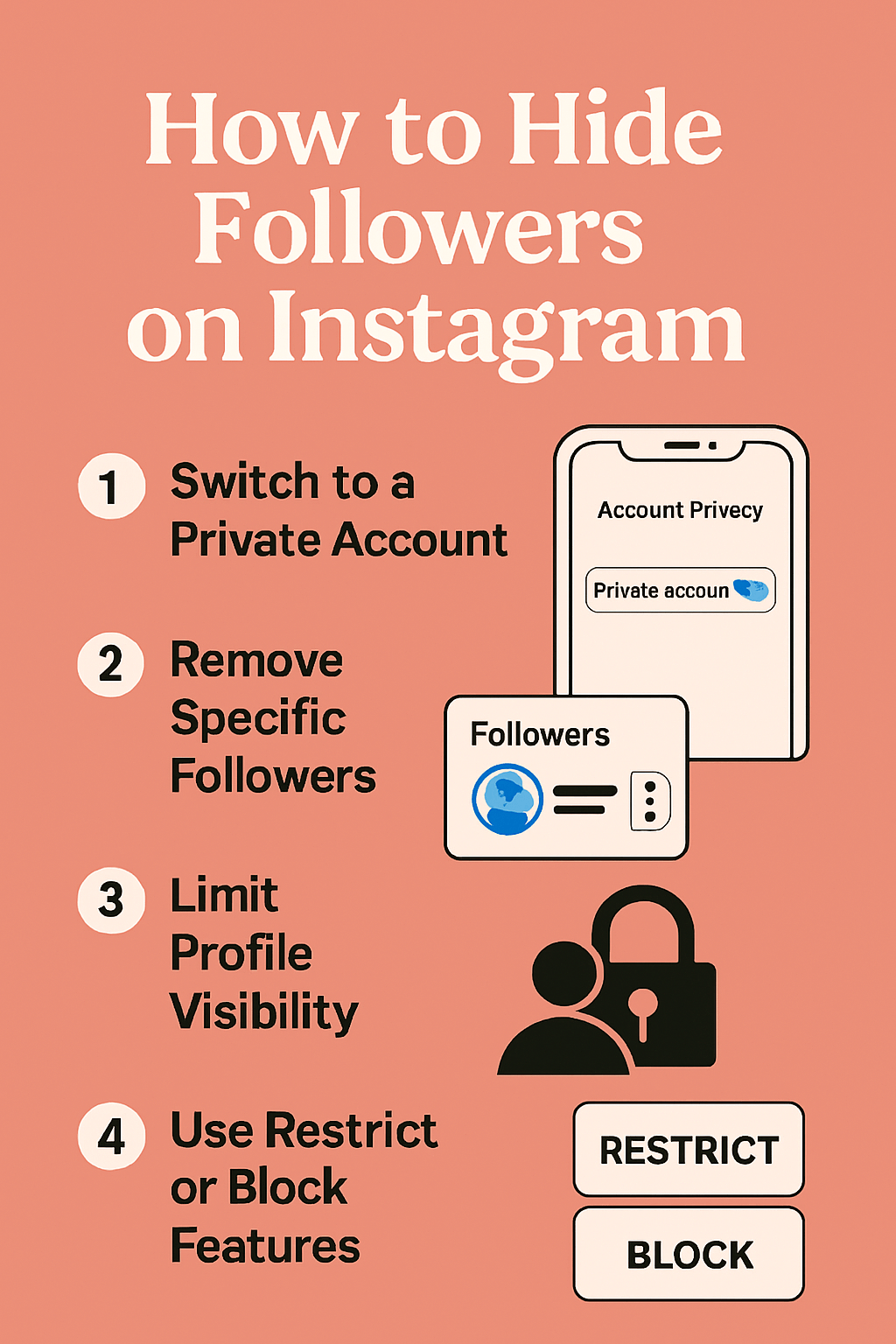
What you can do is control who gets access to your profile in the first place. The only complete method in 2025 is switching to a private account, which limits access to approved followers, though they can still see the list. To further control visibility, you can remove or block followers, restrict accounts, or utilize Story features like Close Friends. Third-party apps that claim to hide followers are unsafe and put your account at risk. While you cannot completely hide your followers, using Instagram’s privacy tools helps limit who sees them.
Why People Want to Hide Their Followers
Not everyone feels comfortable with their followers’ list being public. In 2025, privacy concerns are higher than ever, and many Instagram users seek ways to control who can view their network. There are several reasons why people want this level of privacy.
Protecting personal privacy
Some people prefer to keep their social circles private. They do not want strangers browsing through their followers and forming assumptions about their personal lives. This is especially true for users who share limited personal details but still worry about unwanted attention.
Avoiding harassment or stalking
Follower lists often reveal friends, family members, or close contacts. When someone with malicious intentions gains access, it can lead to harassment of those individuals as well. By hiding or limiting access to followers, users reduce the chances of stalkers or spammers finding more targets.
Professional reasons
For instance, a business account might not want competitors to track every new follower, or an influencer may prefer to keep their growth patterns private. These are just a few examples of how managing follower visibility can be crucial for professional reasons.
Relationship boundaries
Sometimes, the concern is closer to home. Friends, partners, or relatives may look at a follower’s list out of curiosity. That can lead to questions or assumptions that create tension. Many users prefer to avoid this altogether by tightening privacy controls.
A cleaner digital experience
Not everyone wishes to make their profile completely transparent. Controlling who sees your followers is part of building a more comfortable online space. It allows users to enjoy Instagram without worrying about who is analyzing their profile, promoting a cleaner and more enjoyable digital experience.
How to Hide Your Followers on Instagram in 2025
Many users want more control over who sees their Instagram activity. While the platform does not allow you to hide your followers completely, there are settings and tools available in 2025 that help limit access.
Method 1: Make Your Account Private
The simplest way to hide your followers from strangers is by switching your account to private—a private account limits who can see your posts, followers, and following list. Only the people you approve as followers get access.
How to switch to a private account in 2025
- Open Instagram and go to your profile.
- Click the three horizontal lines menu in the top right corner.
- Select Settings and privacy.
- Scroll to Account privacy.
- Toggle on a Private account.
Once you turn this on, anyone who wants to follow you will need to send a request. You can approve or decline based on your choice.
What changes when your account is private
- Strangers cannot see your posts, followers list, or following list.
- Only approved followers get access to this information.
- Your Stories, Highlights, and Reels also become visible to followers only.
Limitations of private accounts
- However, it’s important to note that approved followers can still see your followers list. If you want to hide it from them, you will need to remove or block those users individually.
- Business and creator accounts are intended for public visibility and cannot be made private. If you have one of these accounts, you need to switch to a personal account before you can enable privacy settings. This is an important distinction to keep in mind when considering your privacy options. However, it’s important to note that approved followers can still see your followers list. If you want to hide it from them, you will need to remove or block those users individually.
- Most people begin by switching to private to gain greater control over their data. It creates a clear boundary between your profile and the wider Instagram community, keeping strangers away from your network.
Method 2: Restrict or Block Specific Users
If you don’t want certain people to see your followers but also don’t want to make your entire account private, you can use the Restrict or Block features. These options give you control at the individual level, providing a sense of safety and peace of mind, knowing that you can manage your interactions on the platform.
Restricting a user
The Restrict feature is a discreet way to limit someone’s access without notifying them. Steps to Restrict a user in 2025:
- Open the person’s profile you want to restrict.
- Tap the three-dot menu in the top right corner.
- Select Restrict.
- Confirm your choice.
What happens when you restrict someone:
- Their new comments on your posts are only visible to them until you approve them.
- Their direct messages go to your “Message requests” folder.
- They can’t tell when you’re online or if you’ve read their messages.
- They are not notified that you restricted them. However, they may notice some changes in their interactions with you, such as their comments needing approval or their messages being directed to your ‘Message requests’ folder.
- Restrict is a valuable feature for avoiding conflict. It allows you to limit visibility without removing someone entirely, providing relief and comfort by managing your interactions on the platform.
Blocking a user
Blocking is a more decisive step. It cuts off all contact and visibility. Steps to Block a user in 2025:
- Open their profile.
- Tap the three-dot menu in the top right corner.
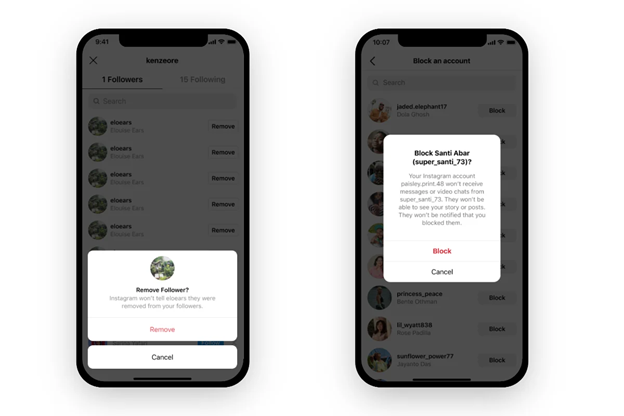
- Select Block.
- Confirm by choosing whether to block just their current account or all accounts they may create.
What happens when you block someone:
- They cannot see your posts, followers, following list, or Stories.
- Their likes and comments on your posts disappear.
- They cannot send you messages.
- They are not notified, but they will realize if they try to search your profile and cannot access it.
- Blocking is best for accounts you do not want in your space at all, such as stalkers, spammers, or people you no longer trust.
Method 3: Remove Followers Without Blocking
Sometimes, you don’t want to block someone, but you also don’t want them on your followers list. Instagram allows you to remove followers discreetly. This is a proper middle ground between keeping someone and blocking them.
How to remove a follower in 2025
- Go to your profile and tap Followers.
- Use the search bar to locate the person you want to remove.
- Tap Remove next to their name.
- Confirm your choice.
What happens when you remove a follower
- They are no longer able to see your private posts, Stories, Reels, and followers list if your account is private.
- They do not get a notification. Instagram removes them silently.
- They can still send you a follow request later, which you can accept or decline.
- Their previous likes and comments on your posts remain unless you delete them manually.
Method 4: Hide Activity With Close Friends Feature
The Close Friends feature is designed for Stories, but it also serves as a powerful tool for controlling visibility on Instagram. While it does not hide your followers list directly, it limits who sees your activity and personal updates, which reduces exposure.
How Close Friends works
When you add people to your Close Friends list, only they can view the Stories you share with that setting. Everyone else, even your approved followers, will not see those Stories.
How to set up Close Friends in 2025
- Visit your profile and select the three-line menu.
- Select Close Friends.
- Add or remove people from your list.
- Before sharing a Story, select Close Friends.
Benefits of Close Friends
- You choose exactly who sees your Stories.
- You can update the list at any time, adding or removing people without needing to notify them.
- People on your Close Friends list will see a green ring around your Story, while others will not see it at all.
Hide Stories from specific people.
If you don’t want someone to see your Stories at all, you can use the Hide Story from feature. Steps:
- Go to Settings and Privacy.
- Tap Story under the Privacy section.
- Select ‘Hide story from,’ then choose the people you’d like to exclude.
This ensures that even if someone is in your followers list, they won’t see your Stories or Highlights if you have hidden them.
Method 5: Control Who Sees Your Followers Through Profile Limitation
Instagram does not allow you to hide your followers list entirely, but you can limit profile visibility through various privacy settings. By adjusting what people can see and how they interact with your account, you reduce attention on your followers.
Key settings to adjust in 2025
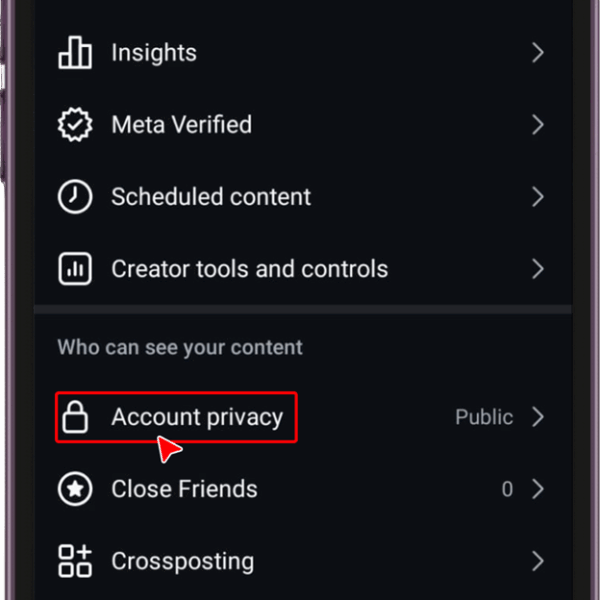
1. Limit interactions
- Go to Settings and privacy → Privacy.
- Use the Limits option to restrict who can comment or interact with your posts temporarily.
- You can apply this to recent followers or accounts not following you.
- This reduces exposure when unwanted users try to engage with your activity.
2. Control comments and tags
- In the Privacy section, open Comments.
- Choose “Allow comments from” → People you follow or Your followers.
- For tags, select Manually approve tags. This prevents random users from tagging you and leading others to your profile.
3. Adjust mentions
- In Tags and mentions, you can set mentions to either ‘People you follow’ or ‘No one’.
- This prevents your username from being exposed in Stories or comments, where new people might attempt to view your followers list.
4. Hide Activity Status
- Navigate to Settings and Privacy → Messages and Story Replies → Activity Status.
- Turn off Show Activity Status.
This prevents others from seeing when you are online, reducing curiosity and visits to your followers list.
How Hidden Followers Appear to Others
On Instagram in 2025, followers are never completely invisible. The way your followers appear to others depends on your account settings and the actions you take.
Public accounts
Anyone can tap on your profile and see your Followers and Following lists. Both lists are obvious, showing usernames and profile pictures. Even people without an Instagram account can see your followers if they use a web browser.
Private accounts
Only approved followers can view your Followers and Following lists. If someone is not following you, they cannot access the lists at all. Instead, they see only the number of followers and those they follow. Example: If your account is private and you have 600 followers, a stranger will only see “600 followers” without being able to open the list.
Blocked users
If you block someone, they will be unable to view your profile, posts, followers, or those you follow. Your account becomes invisible to them, as if it does not exist.
Restricted users
Restricted users can see your followers and following counts, but their interactions are limited. They won’t be notified if you’ve read their messages. They also cannot see your activity status or comment freely without your approval.
Hidden stories and content
Even if someone can view your followers’ list, they may not see interactions if you hide your Stories or posts from them. Example: You hide your Story from one follower. They remain on your followers list, but they no longer see your Stories in their feed.
Comparison With Other Platforms
Follower privacy is handled differently across major social platforms. By comparing Instagram with TikTok, Twitter (X), and Facebook, we can see how Instagram stands in 2025.
TikTok
Profiles can be public or private. On private accounts, only approved followers can see who you follow and who follows you. TikTok also has stricter visibility controls. For example, you can prevent others from downloading your videos or stitching them.
Twitter (X)
Followers and following lists are always public by default. Even with a protected account, approved followers can still see the complete lists. Twitter offers little control over hiding connections. If you want privacy, you must block accounts individually.
Facebook
Friend lists are customizable. You can set your friend list to “Only Me,” which hides it from view entirely. Even if you have a public profile, your connections can be entirely hidden, something Instagram does not allow.
Read More: Top 15 Best Search Engines Other than Google
Does Instagram Lag in Privacy Features?
Yes. Compared to Facebook, Instagram does not offer users the option to hide their followers completely. You can only restrict access through private accounts, blocking, or limiting interactions. Facebook offers more direct control through settings like “Only Me,” while TikTok strikes a better balance between privacy and engagement compared to Instagram.
Instagram’s approach still favors visibility and networking. This benefits influencers and brands but makes it harder for everyday users who want stronger privacy.
Conclusion:
You can’t fully hide your followers on Instagram in 2025. The platform emphasizes visibility, which reduces your control over your connections. Still, you can protect your privacy through existing tools. Setting your account to private, removing unwanted followers, using restrictions, and blocking give you control over who views your activity.
Compared with TikTok and Facebook, Instagram offers fewer direct options for hiding followers. Many users continue to request stronger privacy features so that future updates may include follower list visibility controls. Until then, managing your account settings and carefully curating your followers remains the most effective strategy.
The key is to decide how much exposure you are comfortable with. Once you know your boundaries, use the tools Instagram provides to align your profile with your privacy needs.
Frequently Asked Questions:
No. Instagram does not provide a setting to hide your followers on a public account entirely. Anyone can see your followers list if your profile is public. The only way to restrict access is by switching to a private account or removing and blocking specific followers.
No. Once you block someone, they lose access to your profile, posts, followers, and following. Your account becomes invisible to them, as if it no longer exists.
No. The Close Friends feature applies only to Stories. It does not affect who can see your followers or following lists.
Yes. On private accounts, you can remove followers without them being notified. This silently prevents them from seeing your private posts and Stories.
Yes. Restricting does not hide your followers. It only limits their ability to comment and interact with you.