
How to Unmute Notes on Instagram 2025 | Fix Notes Not Showing
Unmute Notes on Instagram 2025 by going to the person’s profile, tapping “Following,” then selecting “Mute” and toggling off Notes. If Notes aren’t showing, update the app or clear cache to fix the issue.
Instagram keeps adding new features, and one of the most popular is Instagram Notes. These short updates appear at the top of your inbox and let your friends share quick thoughts, emojis, or even music clips. Notes stay visible for 24 hours and are often used to start conversations.
Many users mute Notes when they feel overwhelmed by the number of updates. The problem comes later when you want to see someone’s Notes again, but cannot figure out how to unmute Notes on Instagram. In 2025, the settings have changed slightly, and many people are searching for solutions because Notes are either missing or hidden.
This comprehensive guide is designed to equip you with the knowledge and skills to manage your Instagram Notes effectively. You will learn step-by-step methods on how to unmute Instagram Notes, how to check if you muted someone, and what to do if the unmute option does not appear. Let’s get started!
Table of Contents
Understanding Instagram Notes
Instagram introduced Notes to facilitate easier conversations. They appear at the top of your inbox, right above direct messages. Notes are not long posts or full stories. They are short text updates, emojis, or music clips with a limit of 60 characters.
Instagram Notes are short updates that only stay for 24 hours and then disappear. You can select who can view them — either people you follow back or your Close Friends list. If someone responds to your Note, their message goes directly to your inbox. Unlike Stories, Notes don’t show who viewed them, and no one can tell if you muted or unmuted them. They are designed for quick thoughts, small reminders, or simple updates, rather than lengthy content.
Why People Mute Notes on Instagram
Muting Instagram Notes is standard. Many users mute them for practical reasons, not because they want to completely ignore someone. Understanding these reasons helps explain why unmuting is sometimes necessary later.
Too Many Notes Clutter the Inbox
When a lot of people post Notes, your inbox gets filled with bubbles at the top. This can feel overwhelming and distracting, so muting becomes an easy way to clean the screen.
Repetitive or Irrelevant Updates
Some users post the same type of Notes every day. Others share content that feels off-topic or uninteresting. Instead of unfollowing them, muting Notes helps keep your inbox focused.
Maintaining Focus
People often mute Notes when they need fewer distractions. For example, during work hours or study sessions, muting helps you avoid checking updates every few minutes.
Personal Boundaries
Muting is also about comfort. You may want to stay connected with someone but prefer not to see their constant Notes. Mute lets you do that without blocking or unfollowing.
Temporary Reasons
Remember, muting is not a permanent action. It can be a valuable tool during a busy period or when someone posts more frequently than usual. Later, you can easily unmute Instagram Notes to start seeing their updates again.
What Happens When You Mute Notes on Instagram
Muting Instagram Notes is a personal choice that gives you control over your Instagram experience. It changes only one part of your interaction with the person; their Notes no longer appear above your inbox. This is not the same as unfollowing or restricting; it’s simply a way to manage your feed without severing your connection with the person.
- Notes disappear: The person’s notes will no longer appear at the top of your direct messages screen.
- No notification is sent: Instagram does not notify the person when you mute or unmute their Notes.
- Other content remains visible: You still see their Stories, Posts, Reels, and profile updates unless you mute those separately.
- Messaging stays active: You can still chat with them in DMs without any issue.
- You might forget they posted Notes: Over time, you may think the person stopped posting when, in reality, you muted them.
Why Unmute Notes Matters
When you mute Notes, the feature is always reversible. You can unmute at any time and instantly bring their Notes back into your inbox. This is why knowing the steps to unmute Notes on Instagram in 2025 is essential if you want to stay up to date again. Your control over your Instagram experience is always at your fingertips, providing you with the security to adjust your settings as needed.
Guide On How to Unmute Notes on Instagram

Unmuting Notes is simple once you know where to look. Instagram provides several options to bring Notes back to your inbox. Here are the following methods that work in 2025:
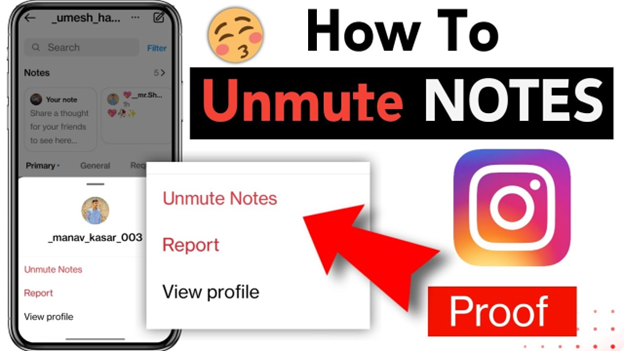
Method 1: Unmute from Direct Messages (Fastest way)
- Open the Instagram app on your phone.
- Access your inbox by tapping the message icon in the top right corner.
- Then, locate the profile picture of the person you muted.
- Tap and hold their profile picture.
- A menu will pop up with options.
- Select Unmute Notes.
- Their Notes will now reappear above your inbox.
Method 2: Unmute from the Person’s Profile
- Open Instagram and search for the profile you muted.
- Tap the Following button on their profile.
- Choose Mute from the menu.
- You will see options for Posts, Stories, and Notes.
- Toggle off the switch for Notes.
- Exit the profile. The person’s Notes should now appear again.
Method 3: Unmute from Instagram Settings (Global view)
- Go to your profile and tap the menu icon (three lines) in the top right.
- Select Settings and Privacy.
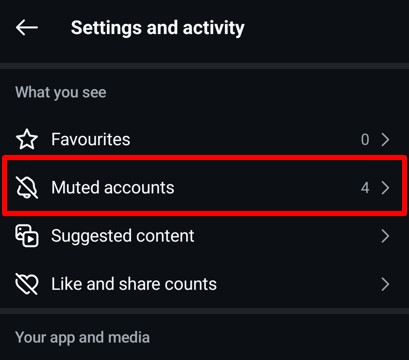
- Scroll down to Muted accounts.
- You’ll see a list of all the accounts you muted.
- Tap the account you want to unmute.
- Switch off the toggle for Notes.
- Refresh your inbox to confirm.
How to Check If You Muted Someone's Notes
Sometimes Notes disappear for reasons other than muting. Before trying to unmute, make sure muting is the reason. Instagram gives a few simple ways to check.
Look At Your Inbox
If a person regularly posts Notes and you no longer see them above your direct messages, there is a chance you muted them. Compare with another account (if you have one). If their Notes appear on another account but not on yours, you likely muted them.
Check Mutes Accounts List
- Navigate to Profile > Menu > Settings and Privacy > Muted Accounts.
- Look through the list. If the person’s profile is there with Notes muted, you found the reason.
Visit Their Profile Directly
- Open their profile and tap “Following”> “Mute”.
- Check the toggle next to Notes. If it is switched on, it means you muted them.
Common Issues When Trying to Unmute Notes
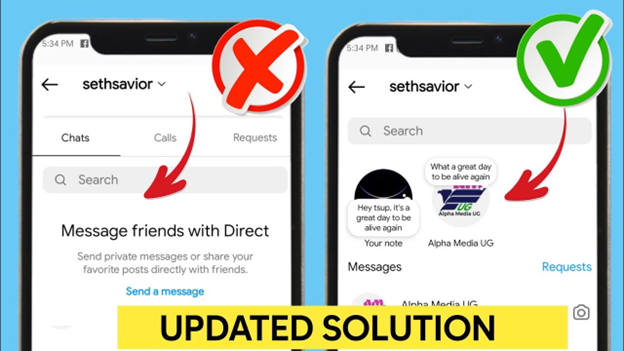
Even after unmuting, some users may still experience issues where Instagram Notes are not displaying. This is frustrating, but it is usually linked to simple issues.
- The person has not posted a Note: Notes last only 24 hours. If the person has not posted recently, there will be nothing to see. Many users believe Notes are missing when, in fact, no update is available.
- App is not updated: Old versions of Instagram often cause missing options. The Unmute Notes toggle may not appear until you install the latest update.
- Glitches in the app: Notes may occasionally disappear due to temporary technical issues. This happens more often after Instagram rolls out new features.
- Muted multiple times unknowingly: You might mute Notes both from the inbox and the profile. Double-check both places to confirm Notes are unmuted everywhere.
- Account restrictions: If the person restricted you, you may not see some of their updates. Instagram also limits visibility if an account is flagged or shadowbanned.
- Cache problem: Cached data sometimes blocks updates from showing correctly. This makes Notes appear to be still muted even after you unmute them.
Fixes and Troubleshooting Tips To Unmute Notes On Instagram
If you have unmuted Notes but they are still missing, try these steps. They usually solve the problem:
Update the Instagram App
- Download the app from the App Store (iOS) or Google Play Store (Android).
- Search for Instagram and tap Update.
- Restart the app and check if Notes appear.
Clear Cache (for Android Users)
- Open Settings on your phone.
- Go to Apps > Instagram > Storage.
- Tap Clear Cache.
- Reopen Instagram and refresh your inbox.
Offload or Reinstall Instagram (for iOS Users)
- Navigate to Settings > General > iPhone Storage > Instagram.
- Choose Offload App to clear temporary files.
- If that doesn’t resolve the issue, try deleting and reinstalling the app.
Log Out and Log In Back
- Open Instagram and navigate to Settings > Log Out.
- Close the app completely.
- Log back in with your username and password.
Check Internet Connection
- Weak Wi-Fi or mobile data can cause Notes to load slowly.
- Switch between Wi-Fi and mobile data to test.
Ask if Notes are Posted
- Sometimes the person simply hasn’t shared a Note.
- Confirm with them before assuming it’s an error.
Check Regional Availability
- Instagram rolls out features gradually.
- If Notes are not available in your country yet, unmuting won’t make them appear.
Wait For Bug Fixes
- If none of the above solutions work, the issue may be on Instagram’s end.
- Bugs usually get patched within days in new updates.
Alternative Methods to See Muted Notes on Instagram
If unmuting does not work or the option is missing, there are still a few ways to check Notes.
Use Another Instagram Account
If you have a secondary account, log in and check if the person’s Notes appear there. This confirms whether the problem is with your main account or if the person has not posted any Notes.
Ask A Friend To Check
If you don’t have a second account, ask a friend to confirm on your behalf. If they see Notes while you don’t, the issue is in your account settings.
Check On Instagram Web
While Instagram Web doesn’t display Notes directly in the same way as the app, some updates may reflect differently. Cross-checking can help rule out app-specific glitches.
Temporary Reinstall Method
Delete Instagram from your device. Reinstall and log in. In most cases, this refresh resets muted settings, and Notes start showing again.
Contact Instagram Help Center
Navigate to Profile > Menu > Settings > Help > Report a Problem. Select the issue and describe that the unmuted Notes are still not showing. Instagram support often resolves account-specific bugs within a few days.
Best Practices for Using Notes
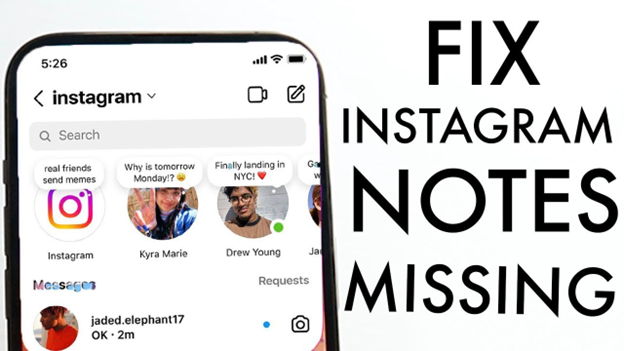
Muting often happens when Notes become repetitive or overwhelming. If you want your Notes to stay visible to followers, you need to post them in a way that feels useful and light.
Keep Notes Short And Meaningful
Notes have a 60-character limit. Use it well. Share updates, reminders, or friendly check-ins instead of random spam.
Avoid Posting Too Often
Posting multiple Notes every few hours makes followers more likely to mute you. One or two Notes per day is enough to stay visible without annoying people.
Mix Up Your Content
Instead of repeating the same emoji or phrase daily, vary your updates. Share a thought, a question, or even a quick mood update.
Use Notes To Start Conversations
Notes are best for short prompts that invite replies. For example, asking a simple question like “Coffee or tea today?” encourages interaction and engagement.
Respect Personal Boundaries
Don’t overshare private or sensitive topics. Followers may mute your Notes if they feel they are too intrusive.
Use the Close Friends Option
If you know some Notes are not for everyone, post them only to your Close Friends list. This reduces the chance of mass muting.
Read More: What is Insanony?
Conclusion:
Instagram Notes are a quick way to share updates, but muting them sometimes hides posts you later want to see. The good news is that muting is not permanent. You can unmute Notes from your inbox, from a profile, or through settings in a few simple steps.
If Notes are still missing after unmuting, the problem usually comes from an outdated app, cache issues, or the fact that the person has not posted anything. Updating Instagram, clearing the cache, or reinstalling the app often resolves the issue.
By following the methods in this guide, you will know precisely how to unmute Notes on Instagram in 2025 and fix the issue when Notes are not showing. This helps you stay connected without missing updates from the people you care about.
Frequently Asked Questions:
Do people know if you mute or unmute their Notes?
No. Instagram does not notify users when you mute or unmute their Notes. Your actions remain private.
Can you mute Notes without muting Stories?
Yes. Instagram allows you to mute individual Notes, Stories, and Posts separately. You can mute only Notes while still seeing Stories and Posts from the same person.
Why don't I see the unmute option on Instagram?
If the unmute option is missing, it usually means your app is outdated. Update Instagram to the latest version. If it still doesn’t show up, try reinstalling the app.
Can I unmute multiple people at once?
No. Instagram only allows you to unmute one person at a time. You must repeat the process for each account.



