

How to Delete Your Telegram Account Permanently: Step-by-Step Guide 2025
Thinking about quitting Telegram? If you’re asking how to delete a Telegram account, you’re not alone. Many people decide to remove their accounts for privacy, security, or simply to reduce the number of apps they no longer use.
Deleting your Telegram account isn’t the same as uninstalling the app. Once you complete the official deletion process, all your chats, groups, contacts, and saved media are permanently erased. Your friends will still see your old messages, but your profile will be replaced with a “Deleted Account.”
You have two ways to leave Telegram: first, you can manually delete it through Telegram’s deactivation page; the second set auto-deletes, so the account erases itself after a chosen period of inactivity.
In this guide, we will carefully explain both methods step by step, describe what happens after deletion, provide instructions on how to back up your data first, and address common issues people encounter. So don’t go anywhere, and let’s get started!
Table of Contents
What Deleting Your Telegram Account Means
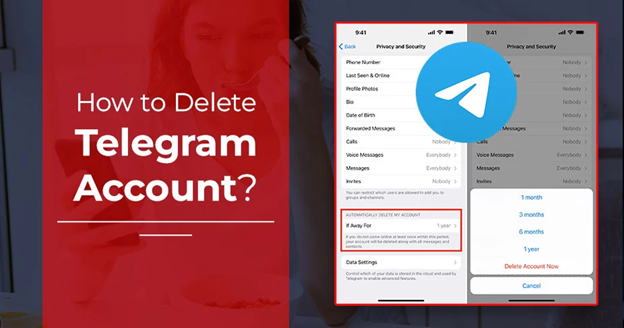
If you’re researching how to delete a Telegram account, it’s crucial to understand that deletion is a permanent action. Once you confirm deletion, your chats, contacts, and cloud-stored media are irreversibly lost. There’s no way to retrieve them from Telegram.
Immediate Effects On Your Account
When you delete your Telegram account, the immediate effects are significant. Your profile, contact list, and synced messages are removed. Any saved media in the cloud will also be deleted from your account. Lastly, you lose access to all groups, channels, and bots you’ve interacted with.
What Other People Still See
Copies of messages you sent remain in other people’s chats. They don’t vanish from recipients’ devices. Your profile shows as “Deleted Account” in old chats. Moreover, Group chats and channels usually stay active after you delete your account.
Groups And Channel Ownership
Telegram has mechanisms that can transfer ownership or remove deleted accounts from member lists. In many cases, an admin with full rights may automatically become the new owner. However, behavior can vary depending on the type of chat and the timing. For a smooth handover, transfer ownership before deleting the account.
What Telegram May Still Keep?
Telegram’s public policy states that it deletes your cloud data when you remove your account. However, the service can retain some metadata or logs for operational, security, or legal reasons for a limited period. Don’t assume immediate erasure of all traces.
Before You Delete Telegram: Backup and Preparation
Deleting your Telegram account is final. To avoid regret, take a moment to consider the consequences before pressing the Delete button.
Export Your Telegram Data
Telegram gives you an official export option in its desktop app.
- Open Telegram Desktop.
- Go to Settings → Advanced → Export Telegram Data.
- Choose what to save: personal chats, group chats, media, stickers, and even account info.
- Pick the file format (HTML is easier to view; JSON is more technical).
- Save the export to your computer.
- This backup is local. It won’t sync back into a new account later, but at least you have a copy.
Save media outside Telegram
Download essential photos, videos, voice notes, and documents to your phone or computer. If you used Telegram’s “Saved Messages” as a cloud storage area, move those files out as well.
Inform Your Contacts
It’s essential to inform your close friends, family, or colleagues about your decision to delete Telegram. This not only avoids confusion when your profile shows as ‘Deleted Account’ but also ensures they know alternative ways to reach you, such as WhatsApp, Signal, or email.
Manage Groups And Channels
If you own or manage a group/channel:
- Transfer ownership to another trusted admin.
- If you don’t, the group or channel may lose proper management.
- For large communities, it’s better to plan the handover before deletion.
Review Alternatives
Maybe you don’t need to delete it entirely. Telegram offers privacy settings that can achieve what many people want:
- Hide your phone number.
- Hide “last seen.”
- Restrict who can call you.
- Enable the auto-delete account after inactivity feature instead of deleting right away.
How To Delete Telegram Account Manually: Step-by-Step Guide

Here’s the specific procedure to permanently delete your Telegram account. Unlike some apps, Telegram doesn’t allow you to delete your account entirely from within the mobile app. You have to use its official deactivation portal in a web browser.
Step 1: Open the Telegram Deactivation Page
- Go to my.telegram.org/auth in any browser (desktop or mobile).
- This is the only official place to start account deletion.
Step 2: Enter Your Phone Number
- Type the number linked to your Telegram account.
- Use international format (e.g., +14155552671).
- Double-check the number before moving on.
Step 3: Get the Confirmation Code
- Telegram sends the login code directly within the Telegram app, rather than via SMS (in most cases).
- Open your Telegram messages, copy the code, and paste it into the browser page.
- If you don’t have access to the app (e.g., your phone is lost), you may encounter issues; see the troubleshooting section later.
Step 4: Access Account Management
- Once logged in, you’ll see options such as API development tools and Deactivate Account.
- Click Delete Account.
Step 5: State the Reason (Optional)
- Telegram may ask why you’re leaving.
- This step is optional — you may choose to skip it or briefly explain why.
Step 6: Account Deleted
- Click Yes, delete my account to confirm.
- Once done, your profile disappears instantly.
- Your chats with others will now show “Deleted Account.”
Auto-Deletion: Using Telegram's Self-Destruct Timer
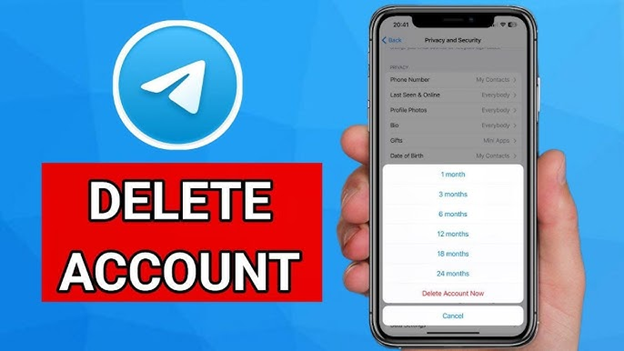
If you don’t want to delete your Telegram account immediately, you can set it to auto-delete after a specified period of inactivity. This option is built into the app and works without needing to visit Telegram’s deactivation page.
What Is Auto-Deletion?
Telegram automatically deletes your account if you don’t log in within a set time. The default period is 6 months of inactivity. You can change this to 1 month, 3 months, or 12 months. After that time, your account, contacts, chats, and media are removed.
Why Use Auto-Deletion Instead of Manual?
You don’t need to go through the website process. If you’re unsure, it gives you time to reconsider—a good option if you’ve lost interest in Telegram but aren’t ready to delete it immediately.
How to Set the Self-Destruct Timer
On Android and iOS:
- Open the Telegram app.
- Tap Settings.
- Go to Privacy and Security.
- Scroll to ‘If Away For’ (sometimes shown as ‘Delete my account if away for’).
- Choose one: 1 month, 3 months, 6 months, or 12 months.
On Desktop:
- Open Telegram Desktop.
- Click the menu → Settings.
- Go to Privacy and Security.
- Under Delete my account if away for, set your preferred time.
What Happens After Auto-Deletion?
After the chosen period, Telegram automatically erases your account. Like manual deletion, all your data will be permanently deleted from your side. Messages in other people’s chats are labeled as “Deleted Account.” You can still re-register later with the same number, but everything starts from zero.
What Happens After You Delete a Telegram Account
Deleting your Telegram account has immediate effects that cannot be reversed. It helps to know exactly what changes, both for you and for the people you’ve chatted with.
Your Profile and Access
Your account is removed from Telegram’s servers. You can’t log back in with your old profile. Profile name, photo, bio, contacts, saved messages, stickers, and files will be removed from your account.
Chats and Messages
Your copy of chats vanishes completely. Messages you sent to others stay in their conversations. Instead of your name, they’ll see “Deleted Account” beside your old messages. Media you shared (photos, videos, documents) remain on recipients’ devices.
Groups and Channels
If you are just a member, you will be removed from those groups/channels. If you were an admin:
- Groups continue to exist.
- Ownership may transfer automatically to another admin if you were the creator.
- If no active admin remains, the group can become unmanaged.
For large groups/channels, it’s best to transfer admin rights before deletion.
Bots and Connected Services
Any bots you created or managed will cease to be linked to your account. Services that used your Telegram login will also stop working, as your credentials are no longer valid.
Common Issues and Troubleshooting When Deleting a Telegram Account
Deleting a Telegram account typically takes a few minutes, but many users encounter issues. Here’s a breakdown of the most common issues and what you can do about them.
Not Receiving the Login Code
Where the code is sent: Telegram typically sends the deletion code directly to your Telegram app, rather than via SMS.
Check: Open the app on the same phone number you entered.
Lost Access to Phone Number
Telegram accounts are tied to phone numbers. If your number is deactivated or reassigned, you will not be able to log in and delete your account.
Options:
- Reactivate the old number (contact your carrier).
- Wait for the auto-delete period to kick in.
Two-Step Verification Issues
If you set up two-factor authentication, you’ll need both your password and the code. Forgot it? Use the recovery email linked to your account. No access to recovery email? Again, you’ll need to wait for auto-deletion.
Code Entered but Still Can’t Delete
Double-check you entered the number with the international code. Clear browser cookies or try another browser/device. Check if Telegram’s servers are temporarily down (although this is rare).
Deleted, But Want to Come Back
Once deleted, you can re-register with the same number. However, your old chats, groups, bots, and media are gone. Telegram may impose a short waiting period before allowing re-registration.
Read More: How To Pause Instagram Reels
Privacy and Data After Deleting Your Telegram Account
If you’ve followed the steps to delete your Telegram account, the next question is: what happens to your personal data? Here’s a detailed look.
Data Removed From Telegram
Your profile information, phone number, contacts, profile photo, bio, and all stored media are deleted from Telegram’s servers. All cloud chats associated with your account are deleted. Stickers, saved messages, and files in your Telegram cloud also disappear.
What Still Remains
Messages you sent to other people remain in their chats. Telegram doesn’t pull them back once delivered. In group chats, your name is displayed as “Deleted Account”, but your messages remain intact. Media or files you shared remain with recipients.
Possible Metadata Retention
Telegram’s privacy policy allows temporary retention of some metadata (like IP logs, device info, or session activity). These records are typically maintained for security, spam prevention, or compliance with legal requirements. They are not accessible to you and cannot restore your account.
Third-Party and Device Storage
If someone downloaded or forwarded your media, those copies remain outside Telegram’s control. Your own devices may still hold cached images, voice notes, or files. Deleting your account does not erase local storage.
Alternatives to Deleting a Telegram Account
Sometimes you may not need to go as far as complete deletion. Instead of wiping everything, you can adjust Telegram settings to limit usage while keeping your account.
Deactivate Notifications
Mute chats or groups that feel overwhelming. Go to the chat → tap Mute → choose time (1 hour, 8 hours, 2 days, or forever). This reduces distractions without deleting your account.
Log Out Instead of Delete
You can log out and uninstall the app without deleting your account, so your data and chats remain safe if you decide to return later.
Change Your Privacy Settings
Hide your phone number, last seen, or profile photo from strangers. Go to Settings → Privacy and Security—control who can add you to groups, forward your messages, or see your activity.
Switch to a New Number
If privacy is your main priority, consider changing your Telegram phone number rather than deleting your account. Your contacts, groups, and chats will be transferred to the new number.
Settings → Privacy and Security → Change Number.
Switch to Alternative Apps
If you want a fresh start, you can move to other platforms instead of deleting Telegram:
- WhatsApp: Popular for family and work groups.
- Signal: Strong privacy focus, minimal data collection.
- Viber: Free calls and stickers, used in many regions.
Read More: What does DBL mean on Instagram
Conclusion:
Deleting your Telegram account is a permanent step, so it’s essential to understand exactly what happens before you proceed. Once deleted, your chats, media, and contacts are gone forever, and you can’t restore them. However, messages you’ve already sent remain in other people’s chats under the label “Deleted Account.”
If your concern is privacy, spam, or distraction, you may not need to delete your Telegram account right away. Options like muting notifications, clearing chats, changing your phone number, or using the self-destruct timer can give you control without losing everything.
But if you’ve decided you no longer want Telegram, the process is quick through the official Telegram Deactivation Page. Please note that you’ll need your phone number for verification, and the deletion will take effect immediately.
FAQs: Delete Telegram
Yes. You can delete it permanently using Telegram’s Deactivation Page. Once deleted, you can’t recover your chats, groups, or contacts.
No. You cannot delete your account using the mobile or desktop app. You must use the Telegram Deactivation Page in a browser.
No. Deletion is permanent. You can sign up again with the same number, but it will create a new account with no data from the old one.
If you use the deactivation page, deletion happens instantly after confirmation. If you rely on auto-deletion, it depends on the time period you set (1, 3, 6, or 12 months).
Your side of the chat is gone, but messages you sent to others remain in their history. Only your account identity is removed.



