
How to Optimize Product Pages for SEO: The Complete Checklist (2027)
Learning how to optimize product pages for SEO is one of the highest-ROI skills in ecommerce SEO. Product pages sit at the bottom of the funnel, where visitors are ready to buy. When these pages rank well, they bring you shoppers with credit cards in hand — not just browsers.
This guide gives you a complete product page SEO checklist, step by step. You will learn how to write titles and descriptions that rank, optimize images, add the right schema markup, handle reviews, and avoid the mistakes that hold most stores back. Everything is beginner-friendly and works on any platform.
What Is Product Page SEO?
Product page SEO is the practice of optimizing individual product pages so they rank higher in search results. It covers everything on the page: the title, description, images, URL, reviews, and behind-the-scenes code like schema markup.
Unlike blog SEO, which targets informational searches, product page SEO targets shoppers. Someone searching “buy wireless headphones under $100” is close to purchasing. Your product page needs to show up, look trustworthy, and answer their questions fast.
How Product Pages Differ From Other Pages
Product pages have unique challenges. They often contain thin content — a short manufacturer description and a few specs. Hundreds of stores may sell the same product with nearly identical text. Google struggles to tell these pages apart.
Product pages also change constantly. Prices update, items go out of stock, and variants come and go. Good product page SEO accounts for this dynamism instead of treating the page like a static article.
Why Product Page SEO Matters So Much
Organic search is one of the cheapest ways to get consistent sales. Paid ads stop working the moment you stop paying. A well-ranked product page keeps bringing buyers month after month at no extra cost.
Product pages also convert better than most content. A visitor reading a blog post might buy someday. A visitor landing on a product page from a “buy” search is ready now. Ranking these pages directly grows revenue, not just traffic.
Shoppers Start on Google
Most online purchases begin with a search. Shoppers compare products, read reviews, and check prices before they buy. If your product pages do not appear in those searches, competitors get the sale.
This is especially true for long-tail product searches like “organic cotton baby blanket neutral colors.” These specific queries have lower competition and higher buying intent. Optimized product pages can win them even without a huge site.
Product Pages Build Long-Term Assets
Every optimized product page is an asset that works while you sleep. Unlike social media posts that fade in days, a ranking product page compounds. It earns traffic, reviews, and links over time, which strengthens its rankings further.
This compounding effect is why ecommerce product optimization pays off most for stores that commit to it across their catalog. Ten optimized pages beat one perfect page.
How Google Reads and Ranks Product Pages
Google treats product pages like any other page, with a few extras. It reads your title, headings, description text, and image alt text to understand what you sell. It also looks at structured data — schema markup — to identify the price, availability, and reviews.
User behavior matters too. If searchers click your result and buy, that is a strong positive signal. If they bounce back to Google immediately, that suggests your page did not satisfy them. Fast, clear, trustworthy pages win.
The Role of Product Schema
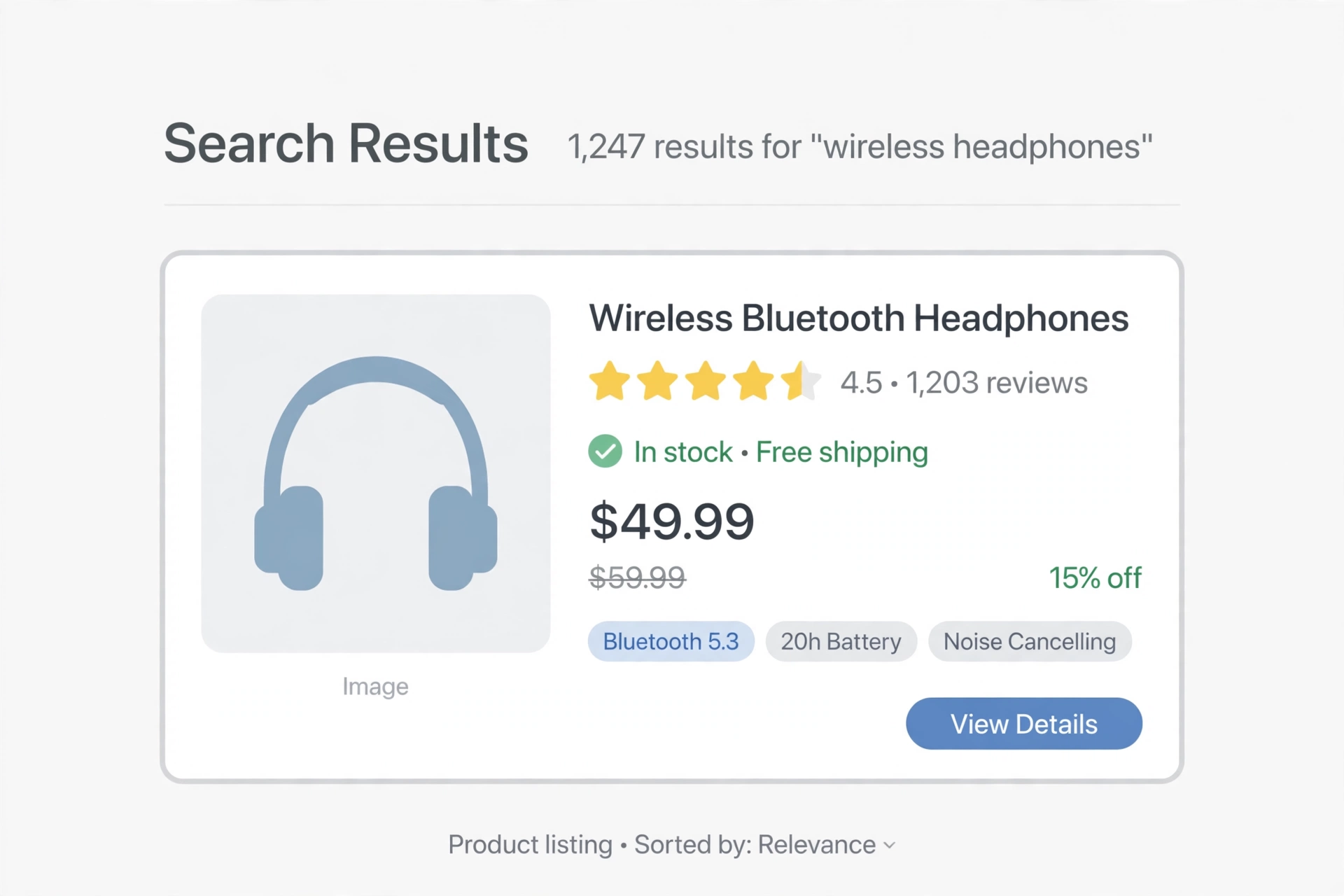
Product schema is code that labels your price, availability, ratings, and review count for search engines. It powers the product page rich results you see in Google: star ratings, prices, and “in stock” labels right in the search results.
These rich results dramatically improve click-through rates. A product listing with stars and a price stands out against plain blue links. Adding product schema is one of the highest-impact steps in this guide.
What Google Wants to See When You Learn How to Optimize Product Pages for SEO
Google wants product pages that help shoppers make decisions. That means unique descriptions (not copied from the manufacturer), clear specifications, real customer reviews, high-quality images, and transparent pricing and shipping info.
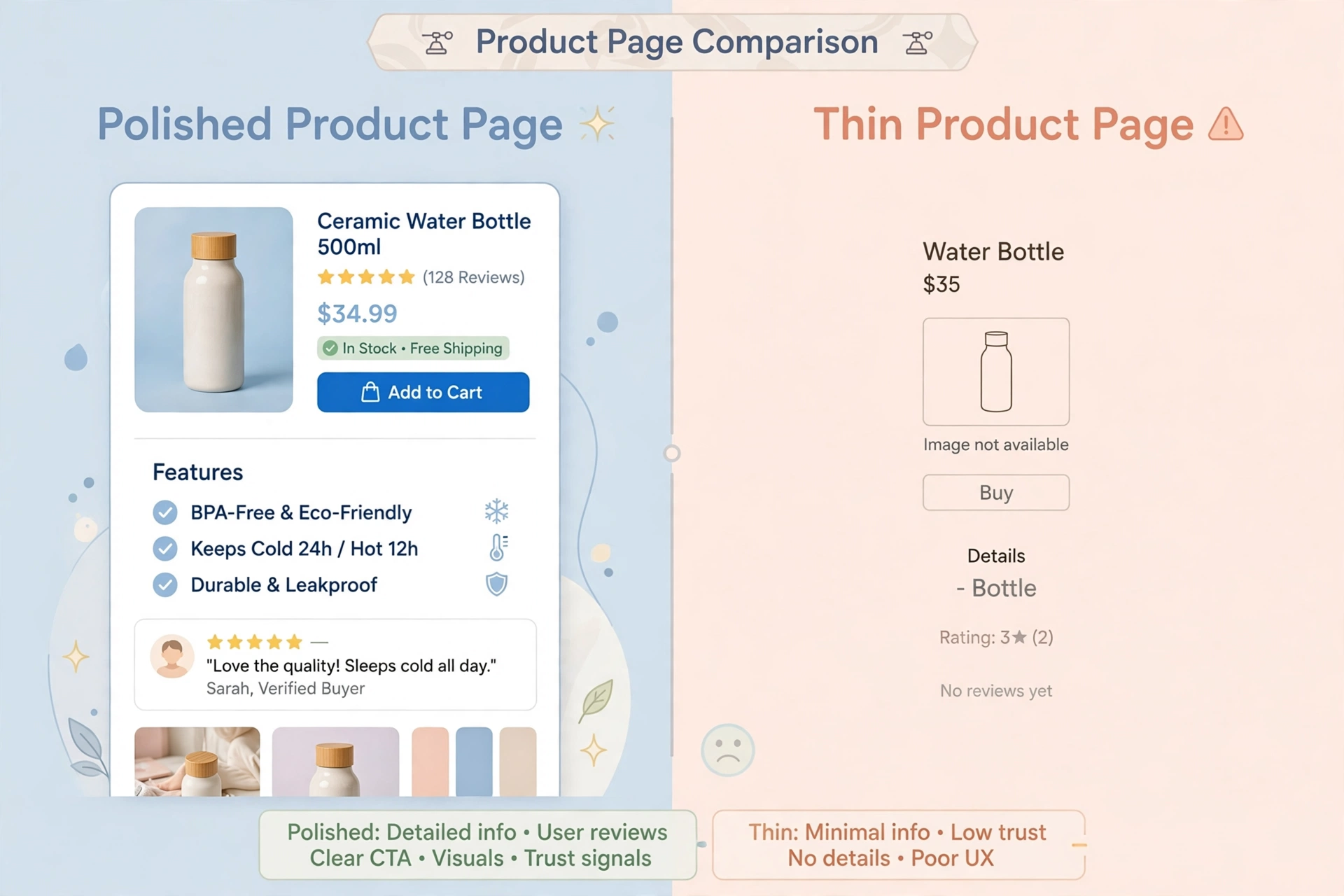
Thin pages with duplicate manufacturer text and no reviews struggle. Google has many similar pages to choose from. Give it reasons to pick yours: original content, genuine reviews, and a better user experience.
How to Optimize Product Pages for SEO: The Step-by-Step Checklist
Work through these steps for each important product page. Start with your bestsellers and highest-margin products, then expand across the catalog. You do not need to do everything in one day.
Step 1: Write a Keyword-Rich Product Title
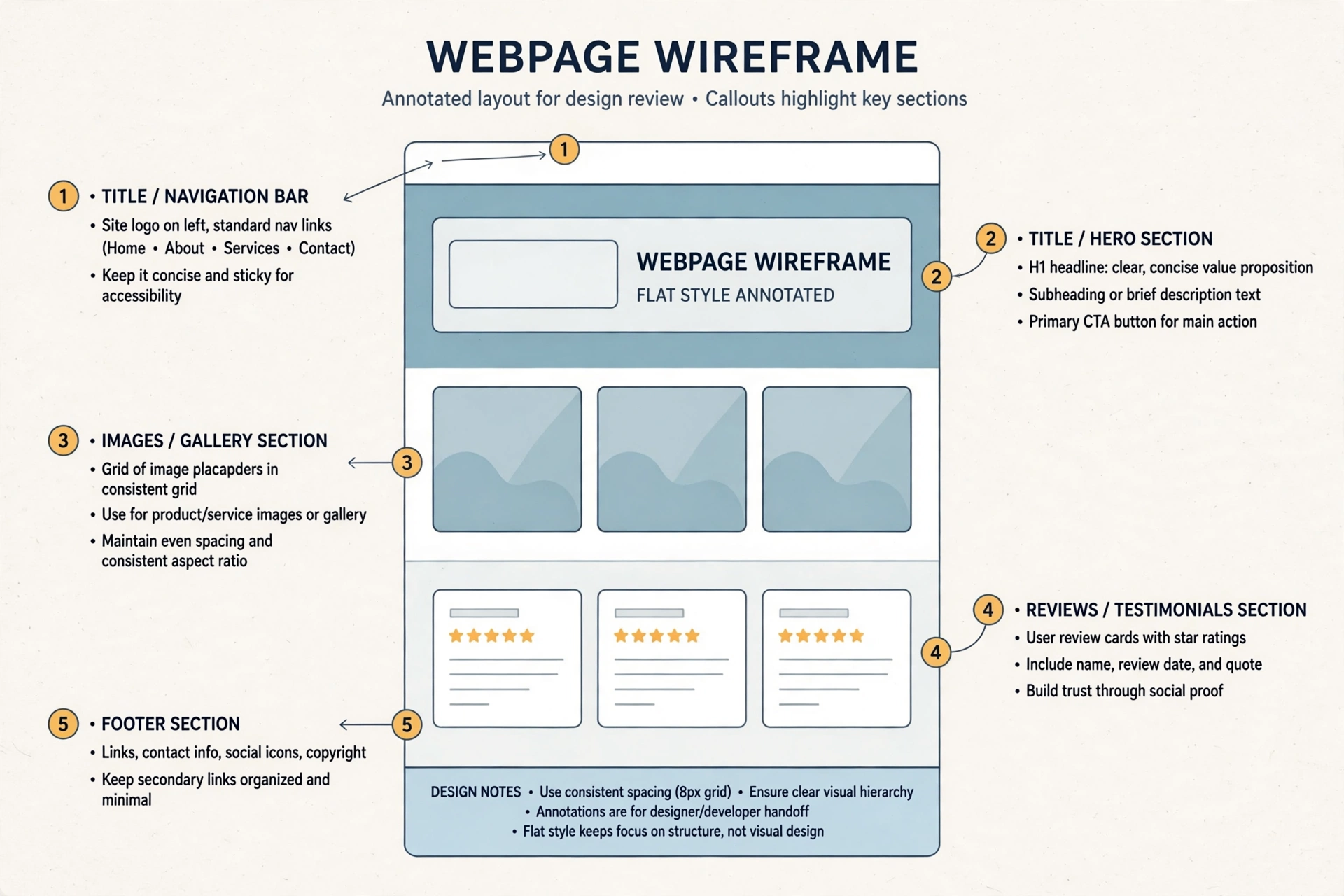
Your product title (the H1 and title tag) should include the main keyword shoppers use. Keep it natural and specific: brand, product type, and key attributes. “Acme Wireless Noise-Cancelling Headphones — Black” beats “Headphones” every time.
Check what top-ranking competitors call the same product. Match the common wording, then differentiate with your unique attributes. Avoid stuffing every possible keyword into the title — readability comes first.
Step 2: Create a Unique Product Description
Never copy the manufacturer’s description word for word. Hundreds of stores do this, and Google sees all those pages as duplicates. Write your own description of at least 300 words that explains who the product is for, what problems it solves, and why yours is worth buying.
Structure it for skimmers: a short intro paragraph, bullet points of key features and benefits, and a specifications section. Write benefits, not just features. “Battery lasts 30 hours” is a feature. “Fly from New York to London twice on one charge” is a benefit.
Step 3: Optimize Your Product Images
Use high-quality, original photos — not just the manufacturer’s stock images. Show the product from multiple angles, in use, and at scale. Original images help you stand out and can rank in Google Images, bringing extra traffic.
Compress every image so pages load fast. Name files descriptively (wireless-headphones-black.jpg, not IMG_4829.jpg) and write clear alt text for each image. Alt text helps visually impaired shoppers and gives Google more context.
Step 4: Add Product Schema Markup
Implement Product schema with price, availability, and review ratings. Most ecommerce platforms offer apps or built-in options for this — Shopify SEO and WooCommerce SEO both start with your platform’s built-in schema settings. If your platform supports it natively, turn it on. See Google’s product structured data documentation for the exact fields to include.
After adding schema, test it with Google’s Rich Results Test. Fix any errors it reports. Valid schema is what earns you star ratings and price displays in search results, which lift click-through rates noticeably.
Step 5: Encourage and Display Customer Reviews
Reviews are conversion gold and SEO gold. They add fresh, unique content to your page automatically. They also feed your star ratings in search results. Pages with genuine reviews consistently outperform identical pages without them.
Make leaving reviews easy. Send a follow-up email after delivery with a direct review link. Respond to reviews — both positive and negative. Never fake reviews; it destroys trust and can get you penalized by platforms and regulators.
Step 6: Build a Smart Internal Linking Structure
Link your product pages from relevant category pages, blog posts, and related products. Internal links help Google discover products and understand which ones matter most. They also keep shoppers browsing instead of bouncing.
Add a “related products” or “customers also bought” section. Link from buying guides to the products they mention. Every important product should be reachable within a few clicks from your homepage.
Step 7: Optimize for Page Speed
Slow product pages kill both rankings and sales. Compress images, remove unused apps and scripts, and use your platform’s built-in speed tools. Test with Google PageSpeed Insights and fix what it flags.
Pay special attention to mobile speed. Most product searches happen on phones. If your page takes more than a few seconds to load on mobile, shoppers leave before they ever see your offer.
Step 8: Handle Out-of-Stock Products Correctly
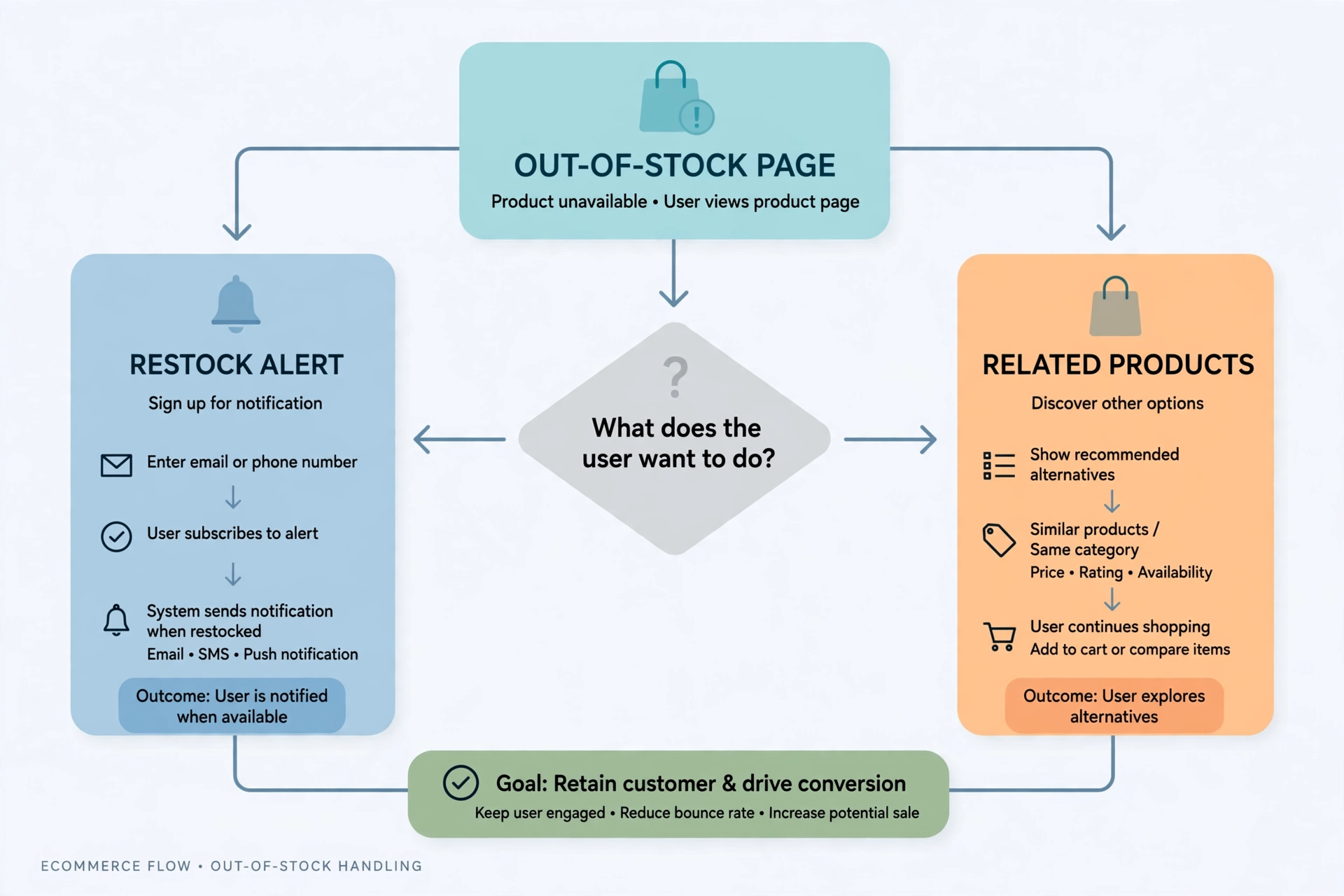
Do not delete out-of-stock product pages that rank well. Deleting them throws away their rankings and any backlinks they earned. Instead, keep the page live with a clear “out of stock” notice, an email-me-when-available option, and links to similar in-stock products.
If a product is discontinued permanently, redirect the URL to the closest replacement or the parent category. This preserves the page’s SEO value instead of wasting it on a 404 error.
Step 9: Write Clear URLs
Keep product URLs short and descriptive: yourstore.com/wireless-noise-cancelling-headphones. Include the main keyword, use hyphens between words, and avoid random numbers or parameters.
Once a URL is live and indexed, do not change it casually. If you must change it, set up a proper 301 redirect from the old URL to the new one so you keep the page’s ranking power.
Step 10: Add an FAQ Section to Product Pages
A short FAQ section answers common pre-purchase questions: sizing, compatibility, shipping times, returns, and warranty. This content targets long-tail searches, reduces support tickets, and keeps shoppers on your page longer.
Write each answer in 40 to 60 words. Mark the section up with FAQ schema so Google can show your answers directly in search results. Base the questions on real customer inquiries, not guesses.
Best Practices for Product Page SEO
Keep descriptions unique across your catalog — this is the heart of product description SEO. If you sell similar products, differentiate each page with specific details, use cases, and specs. Near-duplicate pages compete with each other and confuse Google.
Use canonical tags correctly for product variants. If the same product comes in five colors with five URLs, point the variants to the main version with a canonical tag. This concentrates ranking power instead of splitting it.
Update content regularly. Refresh descriptions when products change, add new reviews prominently, and keep specs accurate. Fresh, accurate pages earn more trust from both shoppers and search engines.
Think mobile-first in everything. Most product discovery happens on phones. Test every page on a real mobile device: can you read the price, see the images, and tap the buy button without zooming or hunting?
Common Mistakes to Avoid
- Copying manufacturer descriptions. Duplicate content makes your page interchangeable with hundreds of others. Write your own.
- Ignoring image optimization. Huge, unnamed images slow your page and waste an Image Search opportunity.
- Skipping schema markup. Without product schema, you miss out on star ratings and prices in search results.
- Deleting out-of-stock pages. Keep ranking pages live or redirect them properly. Do not throw away SEO value.
- Thin content. A title, price, and two sentences are not enough. Give Google and shoppers real substance.
- No reviews strategy. Pages without reviews look untested. Actively collect genuine customer feedback.
- Keyword stuffing titles. “Cheap wireless headphones bluetooth noise cancelling black sale” reads terribly. Write for humans first.
- Forgetting mobile. If the mobile experience is broken, most of your potential buyers never convert.
Expert Tips That Go Beyond the Basics
Add comparison content to competitive product pages. A short “how this compares to similar models” section targets comparison searches and keeps shoppers from leaving to research elsewhere. Honest comparisons build trust and reduce returns.
Use video where it counts. A 60-second product demo can increase time on page and answer questions text cannot. Host it on your page (not just YouTube) and add VideoObject schema for a chance at video rich results.
Target “best” and “review” keywords with buying guides that link to your products. A guide like “Best Wireless Headphones for Remote Work” can rank for high-intent searches and funnel readers to your product pages. This is how smaller stores beat bigger competitors.
Monitor your product page rankings separately from blog content. Product keywords behave differently — they are more competitive and more volatile. Track a dedicated list of product keywords so you notice drops early.
Build backlinks to key product pages, not just your homepage. A few quality links to a flagship product page can lift it past competitors. Digital PR, product reviews by bloggers, and gift guides are natural link sources for products.
Real-World Examples
Example 1: A Small Skincare Store
A boutique skincare shop rewrote all 40 product descriptions in the founder’s voice, adding skin-type guidance and ingredient explanations. They added review schema and an FAQ to each page. Within four months, several products began ranking for long-tail searches like “gentle cleanser for sensitive skin fragrance free,” and organic revenue grew steadily.
Example 2: A Niche Electronics Retailer
An electronics retailer selling refurbished laptops added detailed condition grading, original photos of each unit type, and a comparison table against new models. They kept out-of-stock pages live with restock alerts instead of deleting them. Their category and product pages now capture comparison and “refurbished” searches competitors ignore.
Example 3: A Handmade Jewelry Shop
A jewelry maker added a sizing FAQ, care instructions, and customer photo reviews to every product page. She compressed images and cut load times sharply. Her product pages started appearing in Google Images results, which became a meaningful traffic source — visual products win big in image search.
Product Page SEO in 2026: What Changed
AI Overviews now answer many product questions directly in search results. Shoppers may see prices, ratings, and key specs without clicking. This makes your schema markup and review count even more important — they determine what Google shows about you.
Visual search keeps growing. Shoppers photograph products and search by image. Original, high-quality product photos with good alt text position you well for this trend. Stock manufacturer photos blend in; original photography stands out.
Google’s product review updates continue to reward genuine, hands-on reviews. For stores, this means your own detailed product content and real customer reviews matter more than ever. Thin affiliate-style pages with no original insight keep losing ground.
Important Considerations
Prioritize by revenue impact. You cannot optimize a thousand product pages at once. Start with bestsellers, high-margin items, and pages already getting impressions in Search Console. Expand from there.
Coordinate SEO with inventory reality. There is no point ranking a page for a product you cannot deliver. Keep availability signals accurate, and have a plan for seasonal and discontinued items before problems arise.
Do not neglect category pages. They often rank for broader terms and distribute authority to products. Optimize category titles, add helpful intro content, and keep them fast too.
Measure what matters. Track organic traffic to product pages, but also track revenue from organic search. Rankings without sales mean you are targeting the wrong keywords or your page does not convert.
Want your store to rank higher? Read more ecommerce SEO guides on SearchEngineInsight.
Frequently Asked Questions
How long does product page SEO take to show results?
Most stores see movement within two to four months, depending on competition and how many pages you optimize. New pages may rank for long-tail queries faster. Competitive head terms take longer. Consistent effort across the catalog compounds over time.
What is the most important product page SEO factor?
Unique, helpful content is the foundation — original descriptions, real reviews, and clear specs. On top of that, product schema markup has outsized impact because it earns you rich results with stars and prices. Nail those two and you are ahead of most stores.
Should product descriptions be long or short?
Long enough to be genuinely helpful — aim for at least 300 words of unique content per important product. Cover who it is for, key features and benefits, specs, and common questions. Avoid padding; every paragraph should help a shopper decide.
Can I use the manufacturer’s product description?
You can, but you should not rely on it alone. Duplicate manufacturer text makes your page interchangeable with every other store selling the same item. Always add your own original content: unique intro, use-case guidance, FAQs, and customer reviews.
How do I add product schema to my store?
Most platforms make this easy. Shopify, WooCommerce, and BigCommerce offer built-in schema or apps that add Product markup automatically. After enabling it, validate with Google’s Rich Results Test and fix any errors. Include price, availability, and review data.
Do product page FAQs help SEO?
Yes. FAQs add unique content, target long-tail question searches, and qualify for FAQ rich results when marked up with schema. Base questions on real customer inquiries from support emails and reviews for the best results.
What should I do with out-of-stock product pages?
Keep them live if they rank or have backlinks. Show a clear out-of-stock notice, offer restock alerts, and link to similar available products. Only redirect permanently discontinued items, pointing them to the closest replacement or category page.
How many keywords should a product page target?
Focus each product page on one primary keyword — the main term shoppers use for that product. Support it with natural variations in the description, FAQs, and alt text. Do not force multiple unrelated keywords onto one page; create separate pages or guides instead.
Do reviews really affect product page rankings?
Reviews help in several ways: they add fresh unique content, improve click-through rates via star ratings in search results, and build shopper trust that leads to better engagement. Actively collecting genuine reviews is one of the highest-ROI product page tactics.
Is product page SEO different on Shopify vs WooCommerce?
The principles are identical; only the implementation differs. Both platforms support custom titles, descriptions, alt text, and schema through built-in features or plugins. Choose whichever platform fits your business, and apply the same checklist from this guide.
Conclusion: How to Optimize Product Pages for SEO
Now you know how to optimize product pages for SEO from top to bottom. Write unique, shopper-focused descriptions. Optimize titles, images, and URLs. Add product schema and FAQ markup. Collect genuine reviews, build smart internal links, and keep pages fast on mobile. Start with your bestsellers, work through the checklist methodically, and measure revenue — not just rankings. Product pages are where SEO for online stores turns directly into sales, so every improvement here pays for itself.