
What Does Instagram Person Icon With Plus Sign Mean?
Instagram’s design features dozens of icons, each signaling a specific function. Some are obvious, like the heart for likes or the paper plane for direct messages. Others are less clear. One of the most common sources of confusion in 2025 is the person icon with a plus sign. Many users wonder if it means a follow request, a new follower, or an add friend button. The real meaning is different, and understanding it will empower you to make better use of the platform, giving you a sense of control and confidence.
In this article, we will dissect everything about the person with a plus on Instagram. You will not only decipher the meaning of this icon but also master its strategic use. So, stay tuned and let’s dive in!
Table of Contents
What is an Instagram Person Icon With a Plus Sign: Quick Answer
In 2025, the Instagram person icon with a plus sign acts as a gateway to suggested accounts, encouraging users to discover and connect with new profiles. When you spot it on someone’s profile, Instagram is essentially saying, “Here are other profiles that share your interests.“ A simple tap on the icon opens a list of recommendations that could potentially enhance your Instagram experience, keeping you engaged and interested in the platform.
It does not mean a follow request. It does not mean someone added you. It is a discovery tool designed to help you connect with accounts related to your interests.
In short:
- Icon meaning: Suggested accounts related to the profile you are viewing.
- Action when tapped: Opens a tray of similar profiles.
- Who sees it: Not every profile has it. Instagram shows it where strong lookalike accounts exist.
Where You See the Person-Plus Icon on Instagram
The Instagram person icon with a plus sign does not appear everywhere. In 2025, Instagram places this symbol in specific areas within the app, primarily associated with discovery and recommendations. Knowing where to look helps you understand its purpose and avoid confusing it with other icons.
1. Profile Header Next to "Message" or "Follow"
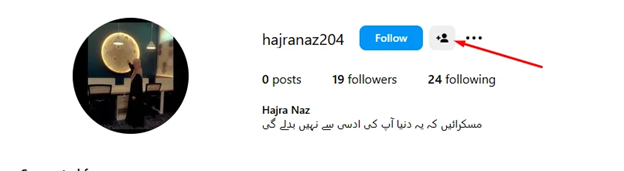
When you visit a profile, you may see the person-plus icon in the top section of the page, close to the “Message” or “Follow” buttons.
Its function here is to open a list of suggested accounts that are similar to the profile you are viewing. For example, if you open a fitness influencer’s page and tap the icon, it may display other fitness trainers or wellness brands.
Instagram uses your past activity, profile categories, and mutual connections to decide which profiles appear in this list.
2. Suggested for You Tray Under Profiles
The icon may occasionally not be visible at the top. Instead, when you scroll down a profile, the person-plus symbol may appear with a “Suggested for You” section.
Instagram utilizes this feature to suggest profiles that are similar to yours. Tapping it again expands the list. These suggestions are based on algorithms that examine interests, hashtags, and engagement.
3. Test Placements During Updates
Instagram often conducts experiments with icon placement. Some users may notice the person-plus icon in slightly different spots, such as near the profile bio or within the followers list. This means you might see the icon in one version of the app but not in another. However, the meaning and function of the icon remain the same, regardless of its placement.
This means you might see the icon in one version of the app but not in another. The meaning remains the same, no matter the placement.
4. Where You Will Not See It
The person-plus icon is not used in feeds, reels, or stories. It differs from the person symbol on posts, which indicates individuals who have been tagged. It is also distinct from the large plus sign at the top of the app, which is used for creating posts, reels, or stories.
What Happens When You Tap the Instagram person Icon

When you tap the Instagram person icon with a plus sign, the app does not send a follow request or alert the other person. Instead, it opens a set of recommendations tailored to the profile you are viewing. Here is what happens step by step:
1. A List of Suggested Accounts Appears
The moment you tap, Instagram displays several profiles connected to the one you are currently on. These can include accounts in the same niche, profiles followed by similar audiences, or pages Instagram thinks align with your interests.
Example: On a fashion blogger’s profile, you might see other bloggers, clothing brands, or styling tips pages.
2. You Decide Whom to Follow
The suggestions tray gives you a choice. You can tap “Follow” directly from the list or tap on each profile to check it out first. Nothing happens automatically. Instagram respects your freedom of choice and will not follow accounts on your behalf, making you feel more in control and respected by the platform.
Read More: Dogpile Search Engine Review
3. Instagram Learns From Your Choices
If you follow multiple profiles from the list, Instagram continues recommending similar accounts. If you ignore or skip them, the app reduces such prompts over time.
4. No Notifications Sent to the Original Profile
The person whose profile you tapped the icon on does not get notified that you used the feature. The icon only serves your discovery, not theirs, ensuring your privacy and respect.
Why You See It on Some Profiles Only
Not every Instagram profile shows the person icon with a plus sign. Many users get confused when they see it on one account but not on another. This difference is intentional. Instagram only displays the icon when its system has enough data to suggest similar profiles.
1. Algorithm-Based Feature
Instagram analyzes each profile’s category, content type, hashtags, and the number of followers. If the system finds a cluster of similar accounts, it activates the person-plus icon. If the profile is unique or has little data, the icon might not appear.
2. Larger Accounts Trigger It More Often
Popular creators, brands, and businesses are more likely to show the icon. This is because Instagram can easily link them to other accounts in the same niche.
Example: On a well-known food blogger’s profile, the icon is almost always present, linking to other food-related pages.
3. Smaller or New Profiles May Not Have It
If the account is new with few posts or followers, Instagram has less information to work with. The system skips showing the person-plus icon until more data is available.
4. Account Settings and Categories Matter
Business accounts with clear categories (such as “Health & Beauty” or “Education”) are more likely to display the icon. Personal accounts without a defined niche are less likely to trigger related suggestions.
How to Use Instagram Person-Plus Icon for Growth
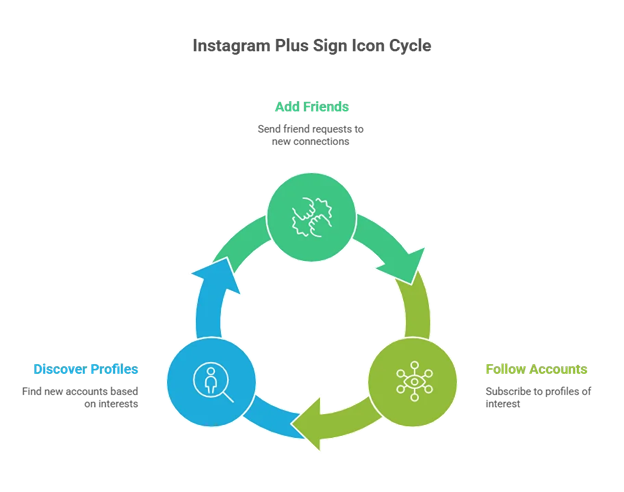
The person-plus icon is a discovery tool. When you tap it, Instagram shows accounts related to the profile you are viewing. You can utilize this feature to grow your profile strategically.
Step 1: Pick Profiles in Your Niche
- Review a few (approximately 3–5) accounts with content in the same niche as yours.
- Tap the person-plus icon on each profile.
- Write down or save 10 suggested accounts from each.
Step 2: Check Each Suggested Account
- Open the profiles from your list.
- Look at their last 9 posts.
- Keep the ones that post regularly, stay in your niche, and get good engagement.
- Aim to keep 5 to 8 strong accounts per profile.
Step 3: Follow Slowly
- From each shortlist, follow 2 to 4 accounts.
- Do not follow too many at once, as it looks spammy.
- Follow only accounts that you plan to interact with.
Step 4: Engage With Their Content
- Save 2 posts from each new account you follow.
- Like and comment on their recent posts, especially ones posted in the last 48 hours.
- Share one helpful post to your story with a short caption.
- This signals to Instagram that you are part of the same community.
Step 5: Match Your Content
- Create two posts or Reels on similar topics to those suggested by the accounts.
- Write clear captions.
- Use 3 to 5 hashtags that those accounts are already using.
Step 6: Measure Results
- Before starting, record your current followers, profile visits, and reach.
- Run this process for 14 days.
- Track follower growth, profile visits, saves, and comments.
- If you notice an increase in profile visits and at least 1.5% of the suggested accounts follow back, repeat the process.
Read More: What is iGram
How to Reduce or Hide Similar Prompts
You cannot entirely remove the Instagram person icon with a plus sign because it is part of Instagram’s interface. Still, you can limit how often you see it or reduce the relevance of the suggested accounts.
Use the “Not Interested” Option
When Instagram displays suggested profiles after you tap the icon, you can mark some as “Not Interested.” This feedback helps the algorithm stop showing similar accounts in the future. Consistent use of this option helps Instagram refine its recommendations.
Adjust Your Engagement
Instagram bases its suggestions on your interactions. If you like, comment, or save many posts in a niche, Instagram will show you more of those accounts. To reduce specific prompts, avoid interacting with profiles or hashtags in that niche.
Change Profile Category (for Business/Creator Accounts)
Business and Creator accounts often show the person-plus icon because their categories are linked to larger pools of similar profiles.
Switching to a more specific category, or even back to a personal account, may reduce the frequency of Instagram suggesting lookalike accounts from your profile.
Review Account Settings
On Instagram’s web platform, you have the option to deselect ‘Show account suggestions on profiles.’
This prevents your own profile from being suggested to others. While it does not remove the icon when you browse, it helps limit how you appear in similar prompts.
iPhone vs Android vs Regions (Instagram person icon)
The Instagram person icon with a plus sign appears slightly different on iPhone and Android devices, but its functionality remains the same across both platforms. Regional factors also affect who sees it and when.
iPhone (iOS)
On iOS, the icon usually appears in the profile header, next to the Message or Follow button. The size and spacing may look slightly different due to Apple’s design standards. Updates often reach iOS first, so that iPhone users may notice the icon changing position during early tests.
Android
On Android devices, the icon’s placement may shift slightly lower or closer to the Follow button. Some users report that the symbol appears more consistently on Android because app updates roll out gradually. Design on Android can vary slightly between manufacturers (such as Samsung and Pixel), but the function remains identical.
Regional Variations
Instagram tests features in selected countries before rolling them out globally. This means you may see the person-plus icon on specific profiles, while a user in another country does not. In regions where Instagram pushes stronger discovery features (such as the US and Europe), the icon is more common. In smaller markets, updates can arrive weeks or months later.
Meaning Stays the Same
Regardless of the platform or region, the symbol always indicates “suggested accounts related to the profile you are viewing.” The only difference is placement, rollout timing, or design polish.
Similar Icons You Might Confuse
Instagram uses many icons featuring a person symbol, and they can be confusing if you are not familiar with the differences. The person icon with a plus sign is only one of them. Here are the main lookalikes and their key differences.
Person Icon on Posts (Tagged People)
Shows up as a simple person-shaped icon without the plus sign. Found on the bottom-left corner of a post when someone has been tagged. Tapping it shows the usernames of people tagged in that photo or video.
Read More: FASTDL Instagram Video Downloader
Purpose: To identify who appears in the content, not to suggest similar accounts.
Add Person Icon in DMs or Group Chats
In direct messages, you may see a person with a plus symbol when adding members to a chat. The context is different here: it means “add people to this conversation.” It does not appear on profiles or affect suggested accounts.
Reposts Tab (New in 2025)
Appears as a two-arrow symbol in a circular shape. Not a person icon, but often mistaken for a profile-related one.
Purpose: To show posts you have reshared.
Step by Step: Use the Icon Without Breaking Your Feed
The person icon with a plus sign on Instagram is designed to help you discover similar accounts; however, if you use it without caution, your feed may become cluttered with irrelevant suggestions. Here is a step-by-step guide to use it wisely.
- Step 1: Identify the Icon
Open a profile. Look for the small person symbol with a plus sign near the follow button or under the profile details. This indicates that Instagram has grouped that profile with other accounts it believes are similar.
- Step 2: Tap the Icon
When you tap the icon, a list of suggested accounts appears. These accounts share traits with the profile you are viewing, such as niche, audience, or posting style.
- Step 3: Review the Suggestions Carefully
Do not follow every suggestion instantly. Open each profile and check content, engagement, and posting consistency. This helps prevent your feed from being cluttered with irrelevant or inactive accounts.
- Step 4: Follow Only High-Quality Accounts
Choose accounts that post regularly and align with your interests. For business or creator goals, select accounts that align with your niche and support networking or trend tracking.
- Step 5: Use “Not Interested” for Cleanup
If you find irrelevant suggestions, tap Not Interested. This helps Instagram refine future recommendations and keep your feed balanced.
- Step 6: Track the Impact on Your Feed
After following the suggested accounts, watch your feed and explore the tab. If posts start feeling irrelevant, consider unfollowing or muting those accounts to reset the algorithm and improve your experience.
Troubleshooting: Why You Don't See the Icon
Not everyone sees the Instagram person icon with a plus sign on profiles. Instagram rolls out features gradually, and several factors can cause them to be hidden or delayed on your account. Here are the main reasons and fixes.
App Version Outdated
Old app versions often lack newer interface icons.
Fix: Check for Instagram updates in the App Store if you’re on iPhone or the Play Store if you’re using Android, and apply the latest update.
Feature Rollout Not Reached Your Region
Instagram tests new features in select countries before rolling them out globally.
Fix: Wait for the official rollout or try logging in from another account in a supported region.
Account Type Restrictions
Instagram may release new tools to Business, Creator, and Personal profiles on separate schedules.
Fix: Switch the account type in settings to see if the icon appears.
Internet or Cache Problems
Slow connections or corrupted cache files may cause parts of the interface to be blocked.
Fix: Clear the app cache (Android) or reinstall the app (iPhone and Android).
Device-Specific Issues
Some older phones miss small design elements after updates.
Fix: Ensure your device runs the latest operating system.
How Creators Use the Person Icon for Growth
The person icon with a plus sign is more than a convenience feature. For creators and brands, it is a growth tool that can increase reach, engagement, and collaboration. Here’s how successful users utilize it.
Discover Niche-Specific Accounts
Creators tap the icon on competitor or industry profiles. They find similar accounts and follow them to learn posting styles, hashtags, and engagement methods.
Example: A fitness trainer viewing another trainer’s profile can instantly see other trainers, nutritionists, or gyms recommended by Instagram.
Build Networking Opportunities
Many creators reach out to suggested accounts for partnerships or shoutouts. Suggested accounts often share a similar audience type, increasing the chances of a successful collaboration.
Example: A travel vlogger may find other travel photographers or agencies through the icon.
Audience Expansion
By following suggested accounts and engaging with their posts, creators expose themselves to new audiences. Shared followers and cross-comments increase visibility without the need for paid ads.
Competitor Benchmarking
The suggested list shows who Instagram considers “similar.” Creators analyze content frequency, follower growth, and engagement metrics of those accounts to adjust their own strategy.
Frequently Asked Questions:
Person icon with a plus sign on Instagram basically a shortcut that takes you to Instagram’s ‘Suggested for You’ recommendations. When you tap it, you see a list of accounts similar to the profile you are viewing.
The icon only appears on profiles where Instagram has enough data to suggest similar accounts. It may also be missing due to app version, account type, or ongoing feature testing.
No. The Follow button subscribes you to one profile. The person-plus icon shows you multiple related profiles in one tap.
No, you cannot remove it. However, you can mark suggestions as ‘Not Interested’ to improve future recommendations.
Yes. Following accounts through the icon signals to Instagram what type of content you like. This influences your explore page and suggested posts.
Not always. Instagram tests features gradually. Some users may see it earlier, depending on their region, account type, or platform updates.
Indirectly. Businesses can utilize it to identify similar accounts, analyze competitors, and connect with their target audience. But it does not guarantee instant follower growt
Conclusion:
The Instagram person icon, accompanied by a plus sign, represents more than a mere design alteration. It connects you with suggested accounts that share themes with the profile you are visiting. For everyday users, it makes following new creators easier. For businesses and influencers, it offers a direct path to competitor research, audience expansion, and content inspiration.
The feature may appear slightly differently on iPhone and Android, and its availability may vary by region, but its meaning remains the same. You cannot turn it off, yet you can shape the recommendations by interacting with suggested accounts.
If you treat the person-plus icon as a discovery tool, it becomes a strategic way to grow your network and strengthen your presence on Instagram.



