
What Does Green Following Mean on Instagram? (2025 Secret Explained)
If you’ve ever tapped into someone’s profile and spotted a green “Following” button instead of the usual grey/blue, you’re not imagining things—and no, it’s not a random theme or a glitch. In 2025, that tiny splash of green quietly signals something from the app that you’ve been given something most people don’t have: a spot in their private circle.
The platform has learned that small visual cues can do a lot of heavy lifting—nudging engagement, hinting at privacy, and creating a “VIP” feel without shouting it from the rooftops. That’s precisely what the green Following state does. It’s a subtle, members-only badge that appears only for you on their profile, telling you you’re part of a more private circle.
In simple terms, the green Following button means they’ve added you to their Close Friends list. It’s Instagram’s way of quietly saying, “You’re in the inner club.” You won’t get a notification; nobody else will see it—only you. But the perks are all yours: more personal posts, behind-the-scenes moments, random life updates, or even sneak peeks they don’t want the whole internet to see.
Why does this matter? Because Instagram has shifted from “share with everyone” to “share with the right ones.” And here’s the thing—Instagram didn’t make this change just for fun. In 2025, the platform is focusing strongly on smaller, more meaningful connections. People no longer want to share everything with everyone. They desire privacy, intimacy, and control—and the green Following button is part of this shift.
In this guide, we’ll explain exactly what it means, how it works, the myths people still believe about it, and even how you can get on (or off) someone’s Close Friends list. Ready to peel back the mystery and use Instagram a little smarter this year? Let’s dive in.
Table of Contents
What is The Green Following Button?
Alright, let’s strip away the mystery first.
The green “Following” button on someone’s Instagram profile indicates that you are on their Close Friends list. That’s it—no secret love messages, no hidden algorithm hacks. It’s just Instagram’s quiet way of letting you know, “Hey, this person trusts you enough to share more private stuff.“
Usually, when you follow someone, that button stays the standard grey (or blue, depending on your theme). But when it turns green, it’s because they’ve specifically added you to a smaller, hand-picked audience. This is the same list that gives you those green story rings that pop up around their profile picture when they post a Close Friends story. In short, you’re in their inner circle if it’s green. How long will you stay there? Well, that’s up to them.
Some of the essential things for you to consider:
- Only you see that it’s green.
- It doesn’t mean they followed you back.
- It’s not tied to likes, comments, or how often you interact with them.
- It can disappear anytime if they remove you from their Close Friends list.
How Instagram's Close Friends Feature Works
Before we go too deep into the green button mystery, let’s talk about what makes it happen in the first place—Close Friends.
Close Friends on Instagram allows you to share content selectively, rather than broadcasting it to all your followers. Think of it like having two versions of your Instagram:
- The public you: posts and stories everyone can see.
- The inner circle you: stuff only a handful of people see.
When you post a story just for Close Friends, Instagram wraps it in a green ring instead of the usual pink/purple gradient. That ring is like a VIP pass, telling the viewer, “You’re on the list.” And if you’re on that list, you’ll also see that person’s Following button turn green on their profile.
The beauty of this feature is that only you know you’re on their list. The person who added you to the Close Friends list can add or remove people whenever they want—no notifications, no awkward “you’ve been kicked out” messages. Moreover, using this feature, you can post as freely as you want without worrying about random coworkers, your old teacher, or that one nosy cousin watching.
People use Close Friends for all kinds of reasons—sharing silly moments, behind-the-scenes peeks, private announcements, or just testing content before they post it publicly. And for influencers or small businesses, it’s a clever way to give loyal followers early access to exclusive offers and content.
Why People Are Noticing The Green Following Button in 2025
Here’s the thing: the green Following button isn’t brand new. It’s been around quietly for a while, but in 2025, it suddenly feels like everyone’s spotting it and wondering what it means.
Why? A few reasons:
1. Instagram's Subtle Design Changes
Over the past year, Instagram has been tweaking the interface to make features more noticeable. The green Following button used to blend in more, but now it pops just enough to catch your eye—especially against the otherwise minimalist profile layout.
2. Close Friends Isn't Just For Friends Anymore
In 2025, Close Friends has become a content strategy. Influencers, small businesses, and even regular users use it to give early access to new products or announcements. Moreover, they share personal “day in the life” moments with loyal followers. Last but not least, they test content before posting it publicly.
3. FOMO (Fear Of Missing Out) Is Real
When people hear “Close Friends,” they think exclusivity. And exclusivity sparks curiosity. Seeing that green button makes you wonder what you might be missing in those private stories—and that curiosity keeps you checking back.
How to Get the Green Following Button on Someone's Profile
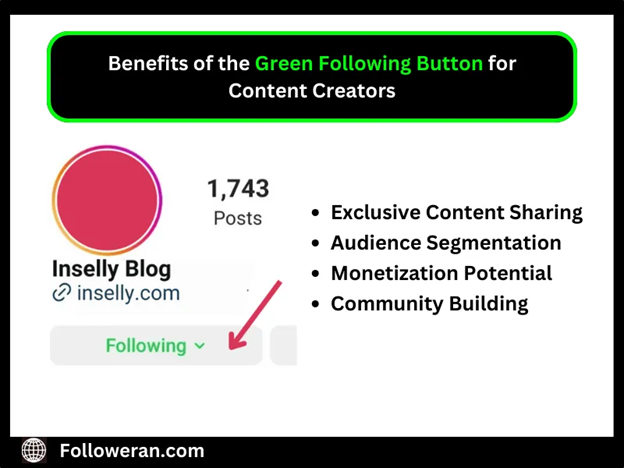
Alright, you’ve seen that green glow on other people’s profiles and thought, “Hmm… how do I get in on that?” There is no magic button to click on to add yourself—it’s entirely up to the other person. But you can increase your chances of being added to their Close Friends list in a few ways.
1. Be Genuinely Active On Their Content
Yes, you have heard it, right? People notice when you consistently engage with them in a real way. You might cut if they feel you’re a loyal, respectful follower.
2. Build A Genuine Connection
If you know them, interact with them in DMs or real life. The Close Friends list is often reserved for people they trust, so it’s key to show that you’re reliable and not likely to screenshot or gossip about their private posts.
3. Respect Their Boundaries
Nobody wants to add someone who oversteps. Avoid spamming likes, flooding their DMs, or reacting to every story—it can feel overwhelming.
4. Understand It's Not Personal If You're Not Added
Sometimes people keep their Close Friends list small— just family or best friends. It doesn’t mean they don’t like you if you’re not on it.
How to Add Someone to the Close Friends List
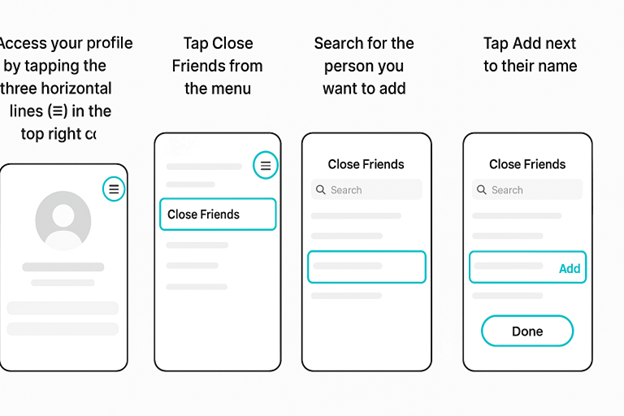
- Access your profile by tapping the three horizontal lines (☰) in the top right corner.
- Tap Close Friends from the menu.
- Search for the person you want to add.
- Tap Add next to their name.
- Hit Done to save.
- That’s it—no notification gets sent to them. But when they visit your profile, their “Following” button will turn green, and they’ll be able to see your Close Friends stories.
How to Remove Someone from the Close Friends List
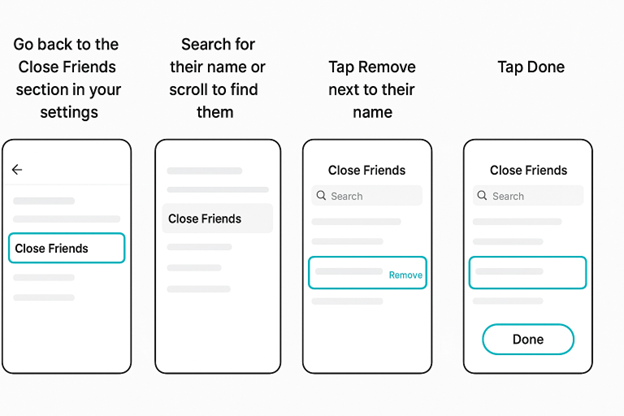
- Go back to the Close Friends section in your settings.
- Search for their name or scroll to find them.
- Tap Remove next to their name.
- Tap Done.
- They won’t be notified about the removal, but they’ll lose access to your Close Friends content—and the green Following button will disappear for them.
Common Misconceptions & Myths About Green Following Button
Like most Instagram features, the green Following button has stirred up a bunch of wild guesses and half-true rumors. Let’s clear the air and separate fact from fiction—because while it is a little exclusive, it’s not as dramatic as some think.
❌ Myth 1: “It means they followed me back.”
Nope. The green Following button is about you being on their Close Friends list—it has nothing to do with whether they follow you. They could follow you… or not at all.
❌ Myth 2: “Everyone can see the green button.”
Absolutely not. Only you see the green Following button when you visit their profile. For everyone else, it looks like the standard grey/blue button.
❌ Myth 3: “They like me more than other followers.”
Maybe… but maybe not. Some people add followers to Close Friends for business reasons, niche content, or even to test posts. It’s not always about personal closeness or friendship.
❌ Myth 4: “Once you’re in Close Friends, you’re in forever.”
That’s not true. You can be removed at any time, quietly and without prior notice. That’s part of the feature’s appeal—flexible and discreet.
Read More: What is iganony?
Green Following vs. Other Instagram Indicators
Here’s a quick breakdown:
Indicator | What It Means | Who Can See It | Extra Notes |
Grey/Blue Following button | Standard follow—you’re following them, but nothing exclusive is happening. | Everyone who visits their profile (in the same way). | This is the default state. |
Green Following button | You’re on their Close Friends list. | Only you see it when you visit their profile. | Gives you access to their Close Friends stories and possibly private posts. |
Green story ring | They’ve posted a story to Close Friends, and you’re part of that audience. | Only Close Friends see it in their story bar. | Tap to view—these disappear after 24 hours. |
Blue verified badge | Instagram has confirmed this account is authentic. | Everyone. | Usually for public figures, brands, and creators. |
“Follow Back” button | They follow you, and you’re not following them yet. | Only you see it on their profile. | Clicking it follows them instantly. |
Following with bell icon | You follow them and have post/story notifications on. | Only you see it. | Bell icon means you’ll get notified when they post. |
Why People Use Close Friends in 2025
By 2025, Instagram’s Close Friends feature will have gone beyond “just for my besties.” It’s become a flexible tool for personal, creative, and professional reasons. Here’s why Close Friends has become such a big deal this year:
Privacy Without Going Private
Not everyone wants to lock their entire profile, but they also don’t want every follower seeing their life updates. Close Friends gives them a middle ground—share freely with a chosen few, while still keeping a public profile for everyone else.
More Authentic Sharing
On the public side of Instagram, people often post polished, filtered, “best version” content. Close Friends is where the unpolished, goofy, and everyday moments live. It’s where you might see someone’s messy room, late-night thoughts, or real-life behind the scenes.
Reducing Unwanted Attention
Close Friends lets you avoid certain followers without blocking or unfollowing them. You don’t include them on the list; they never see those posts.
Privacy & Etiquette Tips
Being on someone’s Close Friends list (and seeing that green Following button) comes with some unspoken responsibility. You’re being trusted with posts and stories they don’t want the whole world to see. Treat that space with respect, and you’ll stay in it. Cross the line, and you might quietly lose the green badge without warning.
Here’s how to handle it the right way:
- Don’t screenshot and share without permission
- Keep it private, even in conversation
- Avoid overreacting to every post
- Don’t assume it means “best friends forever.”
- Respect their content style
- If you don’t want to be on someone’s list, you can opt out
Expert Tips to Make the Most of the Green Following Button
If you use the green Following button (aka Close Friends feature), you might as well do it in a fun, safe way that enhances your Instagram experience. Here’s how to maximize its potential—whether you’re a casual user or a content creator.
- Don’t just add everyone you know. Choose people who genuinely get your vibe, respect your privacy, and will appreciate your behind-the-scenes content.
- If you’re a creator, share sneak peeks, unfiltered opinions, or insider tips that your public audience doesn’t get. It builds loyalty and makes followers feel special.
- Life changes, and so do relationships. Regularly review your Close Friends list to keep it updated.
- Polls, questions, countdowns—these work even better in Close Friends because your audience is smaller and more engaged.
Read More: What is letflix
Conclusion: Green Following Mean on Instagram
In 2025, as Instagram keeps evolving, features like this are shaping how we share online. The green Following button isn’t about showing off—it’s about creating a smaller, more intimate corner of the internet where you can share freely without the noise of a vast audience. It’s a symbol of trust, connection, and exclusivity. It quietly tells you, “You’re in.”
But with this privilege comes responsibility. From respecting privacy to avoiding oversharing, using this feature can strengthen bonds—or accidentally create awkward situations. When used thoughtfully, it can deepen trust, spark better conversations, and make Instagram feel warmer and more personal again.
So next time you see that little green glow, remember—it’s not just a button. It’s an invitation into someone’s inner circle. Treat it carefully, enjoy the inside view, and maybe… send a thank-you DM to let them know you appreciate the trust.
Frequently Asked Questions
Instagram indicates that you are on someone’s Close Friends list. This means they’ve given you access to special, private stories only a select group can see.
No, you only know when you visit someone’s profile and notice the green Following button, or when you see a story ring in green. Instagram doesn’t give a complete list of everyone who’s added you.
Instagram won’t notify them. However, they might notice the green Following button disappearing from your profile or realize they no longer see your Close Friends stories.
Instagram doesn’t publicly share a strict limit, but most users can add hundreds of people. Keeping it small makes the feature feel more special and private.
Absolutely. Brands, influencers, and creators often use it to share exclusive promotions, behind-the-scenes content, or early product previews with a select audience.



