
How to Use ChatGPT for SEO: A Practical Guide (2027)
Learning how to use ChatGPT for SEO can save you hours every week. ChatGPT can brainstorm keywords, draft outlines, write meta descriptions, and speed up content briefs. But it also makes mistakes, invents facts, and cannot replace real SEO data or human judgment.
This guide shows you exactly how to use ChatGPT for SEO the right way. You will learn what it does well, where it falls short, the best prompts for each task, and a repeatable workflow from keyword idea to published article. Everything here is practical and beginner-friendly.
What ChatGPT Can and Cannot Do for SEO
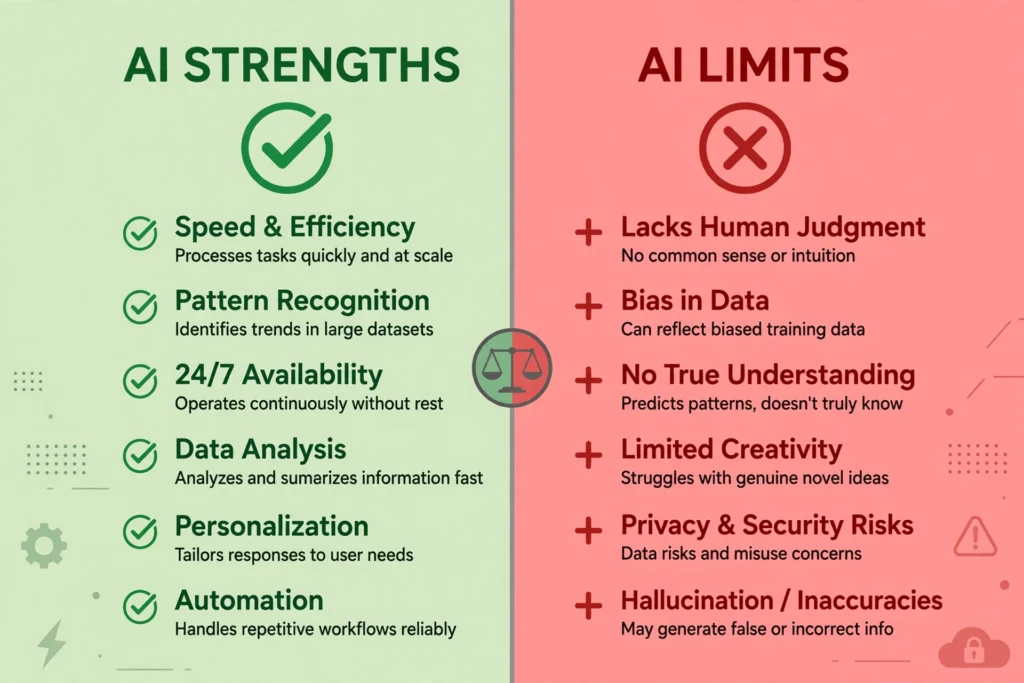
ChatGPT is a language model. It predicts text based on patterns in its training data. That makes it excellent at writing, summarizing, brainstorming, and restructuring information. It is not a search engine, and it does not have live access to Google’s ranking data.
This distinction matters. ChatGPT can suggest keyword ideas, but it cannot tell you real search volumes. It can draft an article, but it cannot verify facts. Use it for language tasks and creative work./ Use real SEO tools for data.
What ChatGPT Does Well
ChatGPT shines at anything involving words. It can turn rough notes into clean outlines, rewrite awkward paragraphs, generate title variations, and draft FAQ sections. It is also great at explaining SEO concepts in simple terms.
It works well as a brainstorming partner. Stuck on content angles? Ask for ten. Need related subtopics for a pillar page? It will list them in seconds. The ideas still need your judgment, but the starting speed is real.
What ChatGPT Cannot Do
ChatGPT cannot browse your site, check your rankings, or pull live keyword data. It may also invent statistics, quotes, and URLs that look real but are not. This is the biggest risk for SEO work.
It also does not know your audience, your brand voice, or your business goals unless you tell it. Generic prompts produce generic output. The quality of what you get depends heavily on the context you provide.
Setting Up ChatGPT for SEO Work
You do not need a complicated setup. A free ChatGPT account handles most SEO tasks. Paid plans offer more capable models and higher usage limits, which help if you use it daily.
Start by creating a simple system. Keep a document of your best prompts so you can reuse them. Save your brand voice guidelines, target audience description, and common instructions in one place. Pasting this context into new chats saves time and improves consistency.
Give ChatGPT Context Every Time
ChatGPT performs better when it knows who you are writing for. Start important tasks with a short context block: your site’s topic, your audience’s level, and the goal of the content. This one habit improves output more than any fancy prompt trick.
For example, tell it you run a beginner SEO blog for small business owners. Tell it the reader’s problem. Tell it what action you want the reader to take. With that context, the suggestions become far more relevant.
Organize Your SEO Prompts
Create a personal prompt library. Group prompts by task: keyword ideas, outlines, titles, meta descriptions, rewrites, and FAQ drafts. Note which ones worked well and tweak the ones that did not.
Over time, this library becomes one of your most valuable assets. Good prompts are reusable. A prompt that produces a great content brief today will produce a great brief next month too.
How to Write Good SEO Prompts
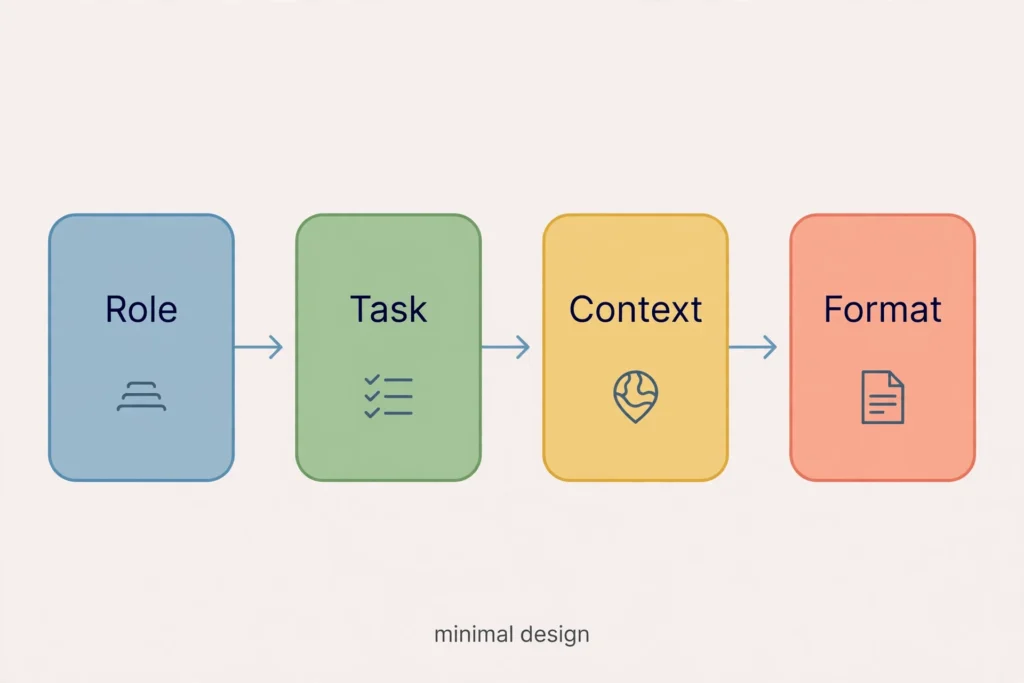
Most bad ChatGPT output comes from bad prompts, not a bad tool. Vague prompts get vague answers. Specific prompts get useful answers. The formula is simple: role, task, context, format.
Tell ChatGPT what role to play, what to do, who it is for, and how to format the answer. Compare “write about SEO” with “act as an SEO content strategist and create a detailed outline for a beginner’s guide to local SEO for bakery owners, with H2 and H3 headings.” The second prompt wins every time.
The Role-Task-Context-Format Formula
Role sets the expertise level. Try “act as an experienced SEO copywriter” or “act as a keyword research specialist.” This steers the tone and depth of the answer.
Task states exactly what you want. Be concrete: “list 20 long-tail keyword ideas” beats “help with keywords.” Context covers your niche, audience, and goal. Format tells it how to present the answer: bullet list, table, or numbered outline.
Ask Follow-Up Questions
Treat ChatGPT like a junior assistant, not a vending machine. If the first answer is too generic, ask it to be more specific. If an outline misses a key section, ask it to add one. Iteration beats perfection on the first try.
You can also ask ChatGPT to critique its own work. Try “what is missing from this outline for a beginner audience?” This often surfaces gaps you would have missed.
How to Use ChatGPT for SEO: The Core Workflows
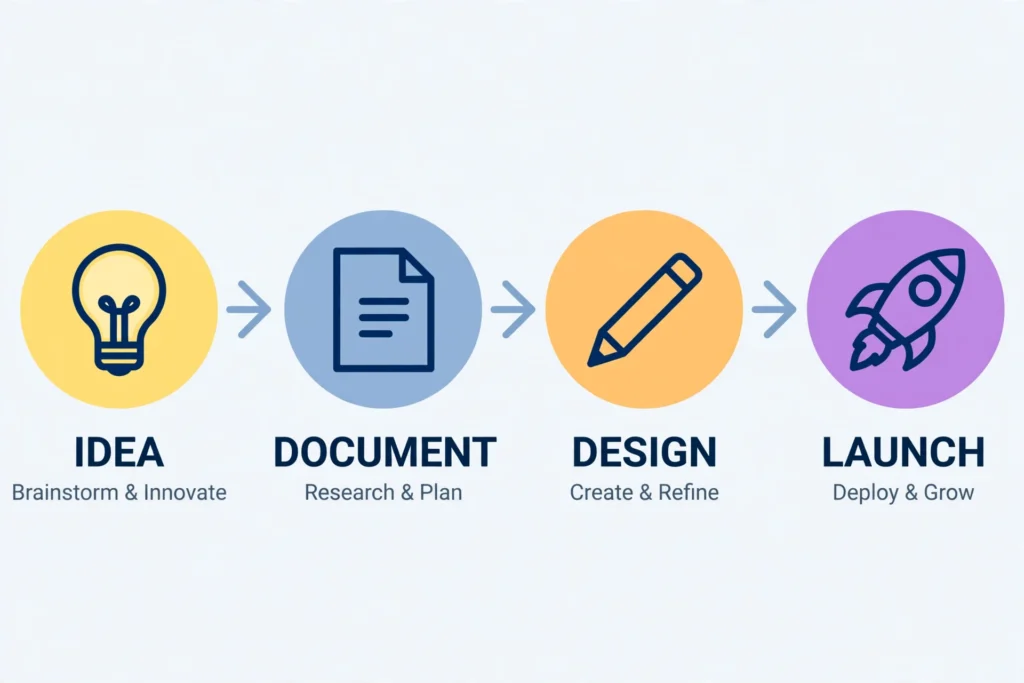
Here is the end-to-end workflow I recommend. It covers the full journey from a seed topic to a published, optimized article. Each step below gets its own section with example prompts.
- Brainstorm keyword and topic ideas.
- Validate ideas with real SEO data (outside ChatGPT).
- Build a detailed content brief and outline.
- Draft the article section by section.
- Edit, fact-check, and add your experience.
- Optimize titles, meta descriptions, and headings.
- Publish and monitor performance.
Notice that steps 2 and 5 happen outside ChatGPT. Real data and human review are non-negotiable. ChatGPT accelerates the middle of the process; it does not replace the edges.
How to Use ChatGPT for SEO: From Idea to Published Post
Start each new article in a fresh chat with your context block pasted in. Work through the steps in order, keeping everything in one conversation so ChatGPT remembers earlier decisions. Save the full chat or copy key outputs into your prompt library.
Time-box each step. Keyword brainstorming should take minutes, not hours. The goal is momentum: get to a solid draft fast, then spend your real energy on editing and adding original value.
Keyword Research With ChatGPT
ChatGPT is useful for the brainstorming stage of keyword research. It can generate topic clusters, long-tail variations, and question-based keywords around a seed topic. What it cannot do is tell you search volume, difficulty, or whether a keyword is worth targeting.
Use this workflow. First, ask ChatGPT for ideas. Then validate every idea with a real keyword tool or Google itself. Never build a content plan on unvalidated AI suggestions alone.
Brainstorming Seed Keywords and Topic Clusters
Start broad. Ask ChatGPT to act as a keyword research specialist and list subtopics around your main topic. Then ask for question-based keywords — the “how,” “what,” and “why” queries real people type.
A useful prompt pattern: “List 30 long-tail keyword ideas related to [topic] for beginners, grouped by search intent: informational, commercial, and transactional.” Grouping by intent helps you plan different content types later.
Finding Questions Your Audience Asks
Question keywords are gold for beginners. They reveal real problems in your audience’s own words. Ask ChatGPT: “What questions do beginners ask about [topic]? List 25 as full questions.”
Take the best ones and check them in Google’s “People also ask” box. If Google shows similar questions, you know real searchers ask them. Those become FAQ sections or standalone articles.
Validating Ideas With Real Data
This step happens outside ChatGPT. Plug your AI-generated ideas into Google Keyword Planner, a free keyword tool, or simply search them on Google. Look at who ranks and how strong those pages are.
If the top results are forums, thin blog posts, or outdated pages, the keyword may be winnable. If page one is dominated by major publications, pick an easier target. ChatGPT gives you the map; real data tells you which roads are open.
Content Briefs and Outlines
This is one of the best uses of ChatGPT for SEO. A good brief keeps your writing focused and complete. ChatGPT can build one in minutes from a target keyword.
Give it the keyword, the search intent, and your audience. Ask for an H2/H3 outline, key points per section, questions to answer, and a suggested word count range. Review the outline against the actual top-ranking pages and adjust.
Building a Brief That Covers Search Intent
Search intent is what the searcher really wants. Before finalizing any brief, look at the top five results for your keyword. Note the format: are they guides, listicles, tools, or product pages? Your brief should match that format.
Ask ChatGPT to analyze intent with you: “The top results for [keyword] are [describe them]. What search intent does this show, and what should my article include to satisfy it?” Then build the outline around that answer.
Turning Outlines Into Section Drafts
Draft one section at a time, not the whole article at once. Give ChatGPT the H2 heading, the key points to cover, and the tone you want. Section-by-section drafting produces better structure than one giant prompt.
After each section, review before moving on. Fix problems early. If section two goes off track, sections three through ten will follow it. A quick human check between sections saves major rewrites later.
Drafting and Improving Content
ChatGPT can produce solid first drafts, especially for straightforward informational content. The draft is a starting point, not a finished article. Plan to edit every draft substantially.
The best approach: draft with AI, then rewrite with your brain. Keep the structure and the useful bits. Replace generic advice with your own examples. Add stories, data, and opinions only you can provide.
Rewriting and Tightening Drafts
ChatGPT is excellent at editing tasks. Paste a dull paragraph and ask it to make it clearer, shorter, or more conversational. Ask for three versions of a headline and pick the best. Use it to simplify jargon for beginners.
A handy prompt: “Rewrite this paragraph for a Grade 6 reading level, keeping the meaning: [paste text].” This is perfect for making technical SEO topics accessible.
Generating Titles and Meta Descriptions
Ask ChatGPT for ten title options under 60 characters that include your keyword. Then pick your favorite and refine it yourself. Do the same for meta descriptions in the 140–160 character range.
Do not accept the first options blindly. AI titles tend toward the generic. Add specificity, numbers, or a clear benefit to make yours stand out in the search results.
On-Page Optimization Tasks
ChatGPT can help with many small on-page tasks. It can suggest internal linking opportunities, draft image alt text, write FAQ schema-friendly answers, and create social media descriptions.
For internal links, paste a list of your existing article titles and ask which ones relate to your new draft and where they might fit naturally. This turns a tedious task into a two-minute job.
Alt Text, FAQs, and Schema Helpers
Ask ChatGPT to draft alt text for your images based on your descriptions of each image. Keep them concise and descriptive. For FAQs, ask it to draft direct 40–60 word answers to your questions, then verify and tighten each one.
It can also draft JSON-LD schema markup for FAQs and how-to content. Always validate the output with Google’s Rich Results Test before publishing. AI-generated code can contain small errors.
Best Practices
Treat ChatGPT as a skilled assistant, not an autopilot. You stay in charge of strategy, facts, and final quality. Set that expectation with yourself before you start, and you will avoid most problems.
Always verify facts. Check every statistic, date, tool name, and claim against a reliable source. AI models state false information with complete confidence. A single invented fact can damage your credibility. See Google’s guidance on AI-generated content for how Google treats AI-written content.
Add original value. Your experience, case studies, screenshots, and opinions are what make content rank and get shared. AI cannot provide these. The more of “you” in the article, the better it performs.
Keep prompts specific and iterate. Short, vague prompts waste time. Invest an extra minute writing a detailed prompt, and ask follow-up questions to refine the output. Good prompting is a skill that improves with practice.
Common Mistakes to Avoid
- Publishing raw AI drafts. Unedited ChatGPT output is generic and often inaccurate. Always edit thoroughly.
- Skipping fact-checking. Verify every claim. ChatGPT invents statistics, quotes, and sources.
- Using AI for keyword data. ChatGPT cannot provide search volumes or difficulty scores. Validate with real tools.
- Writing one giant prompt. Draft section by section for better structure and control.
- Ignoring search intent. Check the actual SERP before writing. AI will happily write the wrong type of content.
- Forgetting your audience. Generic prompts produce generic content. Always include who you are writing for.
- Over-relying on AI for strategy. ChatGPT executes tasks well but cannot set your SEO strategy. That judgment is yours.
Real-World Examples
Example 1: A Blogger Plans a Content Cluster
Sara runs a gardening blog. She asks ChatGPT for 30 long-tail keyword ideas around “indoor plants for beginners,” grouped by intent. She validates them with a free keyword tool and picks twelve. Then she asks ChatGPT to build a content brief for each, with outlines and FAQ questions. Drafting that used to take her a full weekend. Now the briefs are done in an afternoon, and she spends her writing time on the actual articles.
Example 2: A Freelancer Speeds Up Client Work
James is an SEO freelancer. For each client article, he uses ChatGPT to generate title options, meta descriptions, and FAQ drafts. He also uses it to turn client interview notes into structured outlines. The client still reviews every fact, but turnaround time per article dropped sharply. He took on more clients without working longer hours.
Example 3: A Small Team Refreshes Old Content
A three-person marketing team has 80 aging blog posts. They use ChatGPT to suggest updated sections, new FAQ questions based on current search trends, and fresh title options for each post. A human editor reviews every change. Within a quarter, they refreshed the entire archive — a job that would have taken a year manually.
What Changed in 2027
AI models keep improving at following instructions and handling longer documents. The practical effect: you can now feed ChatGPT a full draft and get coherent, section-aware editing suggestions. A year ago, long inputs produced muddled output.
Competition has also intensified. Because everyone can generate content fast, originality matters more. The sites winning in 2027 pair AI speed with genuine experience: real tests, real photos, real data. AI efficiency is table stakes now, not an advantage.
Google’s guidance has stayed consistent: helpful, original content wins regardless of how it is produced. Keep following that principle and you will stay on safe ground. Understanding AI Mode SEO and learning how to track AI search visibility will help you measure how your content performs as AI-driven search grows.
Important Considerations
Protect confidential information. Do not paste client data, unreleased business details, or personal information into AI tools. Treat every prompt as potentially stored and reviewed.
Watch for bias and blandness. ChatGPT tends toward safe, middle-of-the-road advice. Your readers come to you for a point of view. Do not let AI flatten your voice into generic mush.
Keep learning the fundamentals. AI makes execution faster, but SEO strategy still requires understanding search intent, technical basics, and link building. The tool amplifies your knowledge; it does not replace it.
Want more practical ways to use AI for SEO? Explore more AI SEO guides on SearchEngineInsight.
Frequently Asked Questions
How can beginners use ChatGPT for SEO?
Start with simple tasks: brainstorming keyword ideas, drafting outlines, writing meta descriptions, and generating title options. Use the role-task-context-format prompt formula. Always validate keyword ideas with real data and fact-check everything before publishing.
Can ChatGPT do keyword research?
It can brainstorm keyword and topic ideas, including long-tail and question-based variations. It cannot provide search volume, keyword difficulty, or competition data. Treat its ideas as a starting list, then validate each one with a real keyword tool.
Is it safe to publish ChatGPT-written content?
It is safe if the content is helpful, accurate, and edited by a human. Google rewards quality regardless of how content is produced. Never publish raw AI drafts. Fact-check every claim, add your own experience, and edit for clarity and tone.
What are the best ChatGPT prompts for SEO?
The best prompts are specific and include context. Use the formula: role, task, context, format. For example: “Act as an SEO strategist. Create an H2/H3 outline for a beginner’s guide to [topic] for small business owners. Include FAQ questions.” Save prompts that work well.
Can ChatGPT write meta descriptions?
Yes. Ask for options between 140 and 160 characters that include your target keyword and a clear benefit. Request five to ten variations, then pick and polish the best one yourself. AI options tend to be generic, so add specificity.
Does ChatGPT know about current SEO trends?
Its knowledge has limits and cutoffs, so it may miss the newest algorithm updates or tool changes. For current information, verify against fresh sources like Google Search Central or reputable SEO publications. Do not rely on it for breaking SEO news.
How do I stop ChatGPT from making up facts?
Give it less room to invent: ask for outlines and rewrites rather than factual claims. When you need facts, ask it to flag anything uncertain, then verify every statistic, date, and quote yourself against a reliable source before publishing.
Can ChatGPT help with technical SEO?
It can explain technical concepts, draft schema markup, and suggest fixes for common issues like redirect chains or duplicate content. But it cannot crawl your site. Use it for learning and drafting, and rely on tools like Google Search Console for real diagnosis.
Should I use ChatGPT or a specialized SEO tool?
Use both for different jobs. ChatGPT handles writing, brainstorming, and editing. Specialized SEO tools provide keyword data, rank tracking, and site audits. They complement each other; neither replaces the other.
How much time can ChatGPT save on SEO tasks?
It depends on your workflow, but many users report saving several hours per week on drafting, briefs, and meta content. The biggest savings come from outlines, first drafts, and repetitive on-page tasks. Editing and strategy still need your full attention.
Conclusion: How to Use ChatGPT for SEO
Now you know how to use ChatGPT for SEO effectively. Use it to brainstorm keywords, build content briefs, draft sections, and handle repetitive on-page tasks. Validate every keyword idea with real data, fact-check all output, and add your own experience before publishing. Keep humans in charge of strategy and quality. Done right, ChatGPT becomes the hardest-working assistant on your SEO team — fast, tireless, and always ready for the next draft.