Sling Freestream Alternatives: Best Free Streaming Services
Sling Freestream Alternatives are worth exploring if you want more free live TV, movies, TV shows, news, sports, and entertainment without adding another monthly subscription. Sling Freestream itself offers more than 600 free live TV channels and more than 40,000 on-demand movies and shows, with no account or credit card required for basic viewing.
That sounds impressive, but no single streaming service has everything.
You may want more movies.
You may want different live channels.
You may prefer sports.
You may want a larger kids’ section.
Or you may simply want another free service to use when Sling Freestream does not have the show you want.
The good news is that there are many free streaming services available today.
Some focus on live TV. Others focus on movies and shows. Some offer both.
In this guide, we will look at the best Sling Freestream Alternatives, explain what each service offers, compare them, and help you choose the right option.
The goal is simple: help you find more entertainment without forcing you to pay for another expensive subscription.
What Is Sling Freestream?
Before looking at Sling Freestream Alternatives, it helps to understand what Sling Freestream actually offers.
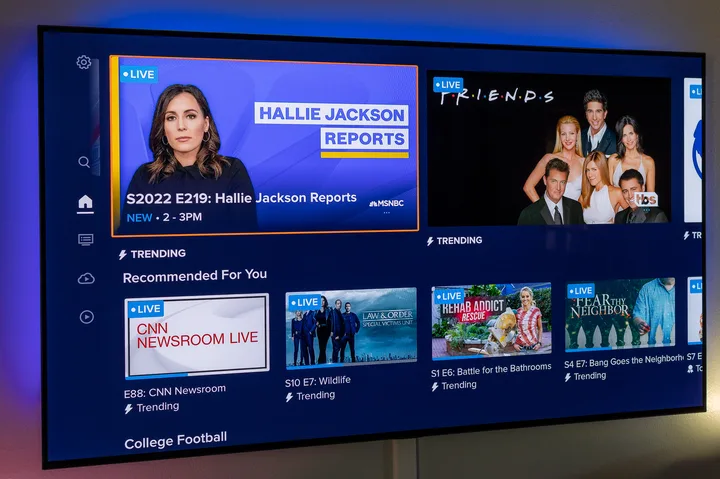
Sling Freestream is Sling’s free, ad-supported streaming service.
It lets users watch live TV and on-demand content without paying for a regular Sling subscription.
According to Sling, Freestream currently offers more than 600 free live channels and more than 40,000 on-demand movies and TV shows. Basic viewing does not require an account or credit card.
You can watch content on supported TVs, phones, tablets, and computers.
Creating a free account is optional.
An account gives you extra features such as:
- Free DVR
- Favorite channels
- Watchlists
- User profiles
- Parental controls
- Personalized viewing features
Sling currently offers up to 10 hours of free DVR storage to Freestream account holders.
This makes Sling Freestream one of the more interesting free live TV options.
However, there are still reasons to look for alternatives.
Why Look for Sling Freestream Alternatives?
Sling Freestream has a large lineup, but every streaming service has limitations.
Here are some common reasons people search for alternatives.
You Want More Movies
Some viewers mainly care about movies.
A service with a large movie library may be a better fit than a service focused heavily on live channels.
You Want Different Channels
A channel that you love may not be available on Sling Freestream.
Free services have different licensing deals, so channel lineups can vary widely.
You Want More Sports
Sling Freestream has some free sports programming, including international sports channels, but serious sports fans may need other services.
For example, Sling’s free international lineup includes Willow Sports and beIN SPORTS XTRA programming.
Still, you may want another free sports service for additional coverage.
You Want More Kids’ Content
Different services have different family and children’s programming.
Using more than one free platform can give your family more choices.
You Want Another Free Option
Sometimes the best reason is simply variety.
There is no rule saying you can only use one free streaming service.
You can use Sling Freestream along with Tubi, Pluto TV, The Roku Channel, Xumo Play, Plex, and other services.
Best Sling Freestream Alternatives
Here are some of the best options to consider:
- Tubi
- Pluto TV
- The Roku Channel
- Xumo Play
- Plex
- YouTube
- Kanopy
- Hoopla
- Freevee-style free content options
- Local broadcast TV with an antenna
Some of these are better for live TV.
Others are better for movies.
Some are especially useful if you already have a library card.
Let’s look at them one by one.
1. Tubi
Tubi is one of the strongest Sling Freestream Alternatives for people who want free movies and TV shows.
Tubi is a free, ad-supported streaming service. Tubi says its service is 100% free and legal, and it does not require credit card information.
Tubi also offers live TV.
Its current U.S. live TV section has more than 260 channels, although channel availability can vary by location.
This makes Tubi useful for both on-demand and live viewing.
What Can You Watch on Tubi?
Tubi has categories covering:
- Movies
- TV shows
- Live news
- Sports
- Comedy
- Reality TV
- Kids and family
- Horror
- Documentaries
- Crime
- Classic TV
- Sci-fi
- Spanish-language content
The service also has a large collection of live channels.
Why Choose Tubi?
Tubi is a strong choice if you want a balance between live TV and on-demand entertainment.
It is especially useful for viewers who enjoy choosing a specific movie or show rather than simply browsing a live channel guide.
Tubi Pros
- Free
- Legal
- Ad-supported
- Large movie selection
- TV shows
- Live channels
- Sports content
- Kids’ content
- No paid subscription required
Tubi Cons
- Ads
- Some content changes over time
- Channel availability varies by location
- Not every premium channel is included
Sling Freestream vs Tubi
If you prefer live TV, Sling Freestream may be more appealing.
If you prefer movies and on-demand TV, Tubi can be a better choice.
For many cord-cutters, using both is the best solution.
2. Pluto TV
Pluto TV is another major competitor and one of the best Sling Freestream Alternatives.
It combines live-style channels with on-demand entertainment.
The experience feels similar to traditional television because you can open a channel guide and see what is playing.
Instead of selecting a movie every time, you can simply browse channels.
What Makes Pluto TV Different?
Pluto TV has many themed channels.
You can find channels focused on:
- Movies
- Comedy
- Crime
- Reality TV
- News
- Sports
- Classic television
- Kids
- Food
- Lifestyle
- Entertainment
It also offers on-demand content.
Why Choose Pluto TV?
Pluto TV is a good choice if you like the feeling of traditional cable TV but do not want a cable bill.
You can turn it on and browse.
You do not always need to spend time deciding what to watch.
Pluto TV Pros
- Free
- Live channels
- On-demand content
- Many themed channels
- Easy channel browsing
- Good for casual viewing
- No traditional subscription required
Pluto TV Cons
- Ads
- Channel lineup can change
- Some content may not be available in every country
- Premium programming is limited
Sling Freestream vs Pluto TV
Both services are excellent for live TV.
Sling Freestream currently advertises more than 600 free live channels, while Pluto TV has its own large collection of free channels.
The better choice depends on the channels and shows you prefer.
Using both can give you a much wider free TV lineup.
3. The Roku Channel
The Roku Channel is another excellent Sling Freestream Alternative.
Roku currently says The Roku Channel offers more than 500 free live TV channels, including news, sports, weather, food, home, reality TV, and kids’ entertainment.
It also offers free movies and TV shows.
One advantage of The Roku Channel is the combination of live and on-demand content.
What Can You Watch?
The Roku Channel includes categories such as:
- Movies
- TV shows
- Live news
- Sports
- Weather
- Reality TV
- Kids
- Comedy
- Food
- Lifestyle
- Roku Originals
Roku also offers free original programming through The Roku Channel.
Why Choose The Roku Channel?
It is particularly attractive if you already use a Roku TV or Roku streaming device.
Roku also says its users can access the free live TV guide directly from supported Roku devices.
Roku Channel Pros
- Free live TV
- 500+ live channels
- Free movies
- Free TV shows
- Roku Originals
- News and sports
- Kids’ content
- Easy live TV guide
Roku Channel Cons
- Ads
- Some features depend on device or location
- Some content requires a separate subscription
- Not every channel is available everywhere
Sling Freestream vs The Roku Channel
Both are strong choices for live TV.
Sling Freestream may appeal to users who want Sling’s international programming and free DVR.
The Roku Channel may be more attractive to viewers who already use Roku devices and want a large free live TV guide.
4. Xumo Play
Xumo Play is another good choice for people looking for Sling Freestream Alternatives.
Xumo currently describes Xumo Play as a free, ad-supported streaming service with more than 350 live channels and thousands of on-demand titles. Its official pages currently list 15,000 titles on demand on one Xumo product page.
You do not need a subscription.
You also do not need a login to start watching.
What Does Xumo Play Offer?
Xumo Play includes:
- Live TV
- Movies
- TV shows
- News
- Sports
- Kids’ content
- Reality programming
- Classic entertainment
- Specialty channels
Xumo also promotes free sports channels, including NBC Sports NOW, CBS Sports HQ, FOX Sports, and other sports-focused programming on its platform.
Why Choose Xumo Play?
Xumo Play is a good choice if you want simple free TV without creating an account.
Its no-login approach makes it easy to start watching.
Xumo Play Pros
- Free
- No subscription
- No login required
- Live channels
- On-demand content
- Sports programming
- Available across multiple devices
Xumo Play Cons
- Ads
- Smaller overall channel count than Sling Freestream
- Content changes
- Some programming varies by location
Sling Freestream vs Xumo Play
Sling Freestream currently advertises more than 600 free live channels.
Xumo Play offers 350+ live channels.
However, channel quantity is not everything.
You may find a particular channel on Xumo that you cannot find on Sling.
That is why using both can be useful.
5. Plex
Plex is another option worth considering.
Many people know Plex as a personal media server, but Plex also provides free ad-supported movies, TV shows, and live TV channels.
This makes it useful for people who want both personal media management and free streaming.
What Makes Plex Interesting?
Plex is different from Sling Freestream because it has a broader media ecosystem.
You can use Plex to organize personal media while also exploring its free streaming content.
Plex Pros
- Free streaming options
- Movies
- TV shows
- Live channels
- Personal media organization
- Available across many devices
Plex Cons
- Ads on free content
- Some features are paid
- Interface may feel more complex than simple free TV apps
Sling Freestream vs Plex
Choose Sling Freestream if your main goal is live TV.
Choose Plex if you also want a platform for managing your own media.
6. YouTube
YouTube may not be the first service people think about when searching for Sling Freestream Alternatives, but it deserves attention.
There is a huge amount of free content on YouTube.
You can find:
- News
- Documentaries
- Movies
- Sports highlights
- Interviews
- Educational videos
- Music
- Kids’ content
- TV clips
- Live streams
Some channels also provide 24/7 live programming.
Why Choose YouTube?
The biggest advantage is variety.
YouTube is not limited to one type of content.
You can watch something for entertainment, learning, news, or background viewing.
YouTube Pros
- Huge amount of content
- Free videos
- Live streams
- News
- Educational content
- Mobile support
- Smart TV support
YouTube Cons
- Not a traditional live TV replacement
- Content quality varies
- Ads
- Some premium content requires payment
Sling Freestream vs YouTube
Sling Freestream is better if you want a traditional channel guide.
YouTube is better if you want a huge range of individual videos and live streams.
7. Kanopy
Kanopy is an excellent option for people who want movies, documentaries, educational content, and independent films.
However, it works differently from Sling Freestream.
Kanopy is generally accessed through participating libraries and educational institutions.
If your library provides Kanopy access, you may be able to watch content without paying directly.
Why Choose Kanopy?
Kanopy is especially useful for:
- Documentaries
- Independent films
- Classic movies
- Educational content
- International films
- Students
- Library users
Kanopy Pros
- High-quality film selection
- Educational content
- Documentaries
- Independent movies
- Library access
- Good for students
Kanopy Cons
- Library participation is required
- Viewing limits may apply
- It is not primarily a live TV service
Sling Freestream vs Kanopy
These two services serve different purposes.
Sling Freestream is better for live TV.
Kanopy is better for educational and film-focused viewing.
Using both can give you a wider entertainment selection.
8. Hoopla
Hoopla is another library-based alternative.
It can provide access to:
- Movies
- TV shows
- Audiobooks
- eBooks
- Comics
- Music
You generally need a library card from a participating library.
Why Choose Hoopla?
Hoopla is particularly useful if you want more than video.
Instead of only watching movies and shows, you can also borrow digital books, audiobooks, comics, and music.
Hoopla Pros
- Free through participating libraries
- Movies
- TV shows
- Audiobooks
- eBooks
- Comics
- Music
- Mobile access
Hoopla Cons
- Library card required
- Borrowing limits may apply
- Not a traditional live TV service
Sling Freestream vs Hoopla
Sling Freestream is much better for live TV.
Hoopla is better if you want a broader digital library experience.
9. Free Local TV With an Antenna
Sometimes the best Sling Freestream Alternative is not another streaming app.
It is an antenna.
An HDTV antenna can receive local over-the-air channels without a monthly streaming subscription.
Depending on where you live, you may receive channels such as:
- ABC
- CBS
- NBC
- FOX
- PBS
- Local news
- Local weather
- Other broadcast stations
Roku also explains that compatible Roku TVs can combine antenna channels with free streaming channels in the live TV guide.
Why Choose an Antenna?
An antenna can be useful if you want local television.
Streaming services do not always provide every local broadcast channel.
An antenna can fill that gap.
Antenna Pros
- No monthly streaming fee
- Local channels
- Live broadcasts
- Local news
- Sports on local networks
- Works without a streaming subscription
Antenna Cons
- Signal depends on location
- Requires an antenna
- Channel selection varies
- Does not provide a huge on-demand library
Best Sling Freestream Alternatives Compared
| Service | Main Strength | Live TV | On-Demand | Free |
| Sling Freestream | Free live TV | Yes | Yes | Yes |
| Tubi | Movies and TV | Yes | Yes | Yes |
| Pluto TV | Channel-style TV | Yes | Yes | Yes |
| The Roku Channel | Live TV and originals | Yes | Yes | Yes |
| Xumo Play | Simple free TV | Yes | Yes | Yes |
| Plex | Streaming + personal media | Yes | Yes | Yes |
| YouTube | Videos and live streams | Limited | Yes | Yes |
| Kanopy | Films and documentaries | Limited | Yes | Through participating libraries |
| Hoopla | Digital library | Limited | Yes | Through participating libraries |
| Antenna | Local TV | Yes | No | Yes |
This table shows why there is no single “best” alternative.
The right service depends on what you want to watch.
Best Sling Freestream Alternative for Movies
If movies are your main priority, Tubi is one of the strongest options to try.
Tubi offers a large on-demand library and also has live channels.
You can browse categories such as horror, documentaries, classic TV, crime, comedy, kids, and more.
The Roku Channel is another good choice because it also combines free movies with live channels and Roku Originals.
Best Alternative for Live TV
If live TV is your main goal, several services deserve attention.
Sling Freestream
Best for a very large free channel lineup and free DVR.
Pluto TV
Best for channel-style browsing.
The Roku Channel
Best for a large free live TV guide.
Xumo Play
Best for simple no-login viewing.
Best Alternative for Sports
Sports can be tricky because many major games require paid rights.
However, free services still provide sports-related programming.
Sling Freestream’s international section includes Willow Sports and beIN SPORTS XTRA.
Xumo Play also offers sports-focused channels.
Tubi has more than 260 live channels in the U.S., including sports channels such as the NFL Channel, FOX Sports on Tubi, DAZN Ringside, and DAZN Women’s Football.
For major live sports, however, always check the current rights for the event you want.
A service can offer sports channels without carrying every game.
Best Alternative for News
If you mainly watch news, Sling Freestream, Tubi, The Roku Channel, and Xumo Play are all worth checking.
Sling Freestream currently includes free news programming, including ABC News content.
Tubi’s live TV section also includes national news channels such as ABC News Live and NBC News NOW.
The Roku Channel offers live news and local news options.
Best Alternative for International Content
Sling Freestream is actually difficult to beat in this area.
Its free international section includes South Asian, Arabic, European, East Asian, Brazilian, and sports programming.
For South Asian viewers, Sling currently promotes free channels such as Aaj Tak, ARY Digital, Shemaroo Bollywood, Sony Kal, and Willow Sports.
This can make Sling Freestream particularly attractive to viewers who want Hindi, Urdu, or other international programming.
If you mainly want international TV, Sling Freestream itself may be better than many of its alternatives.
Best Alternative for Families
Families should look at the kids’ content and parental controls available on each service.
Sling Freestream allows parental controls through a free account.
The Roku Channel also provides kids’ entertainment.
Tubi has a Kids & Family category.
Xumo Play also includes family-friendly programming.
The best option will depend on the age of your children and the shows they enjoy.
Are Sling Freestream Alternatives Free?
Many of them are.
Tubi, Pluto TV, The Roku Channel, and Xumo Play all operate free ad-supported services.
However, “free” does not always mean every piece of content is free.
Some platforms also offer paid subscriptions or premium content.
Always check the title or channel before assuming everything on a platform is included.
Do Free Streaming Services Have Ads?
Yes.
Most free streaming services use advertising to pay for their content.
This includes services such as Sling Freestream, Tubi, Pluto TV, and Xumo Play.
Ads are the trade-off for not paying a monthly subscription.
If you want completely ad-free viewing, you will usually need a paid service.
Are Sling Freestream Alternatives Legal?
The services discussed above are established streaming platforms.
However, it is important to distinguish official free streaming services from random websites that claim to offer free movies and live TV.
A legitimate free streaming platform normally has clear information about its service, apps, privacy policy, and content.
For example, Tubi explicitly states that its service is free and legal.
When searching for free streaming, use official websites and official apps.
Avoid suspicious websites that ask you to download unknown software or modified apps.
Can You Use Multiple Sling Freestream Alternatives?
Yes.
In fact, this can be the smartest approach.
You do not need to choose just one.
For example, you could create a free streaming setup like this:
Sling Freestream: Live TV and international channels
Tubi: Movies and TV shows
Pluto TV: Channel-style entertainment
The Roku Channel: Live TV and Roku Originals
Xumo Play: Additional free live channels
Kanopy: Documentaries and independent films
Hoopla: Library content and digital books
This setup gives you a huge amount of entertainment without paying for multiple monthly subscriptions.
Why Free Streaming Services Are Popular
The streaming market has changed significantly.
People once moved from cable to streaming because streaming was cheaper.
But as more services appeared, many households ended up paying for several subscriptions.
One service became two.
Two became four.
Then five or six.
The monthly bill started looking more like cable.
Instead of paying for every service, viewers can combine free platforms with one or two paid subscriptions.
This can lower the total cost.
How to Choose the Right Sling Freestream Alternative
Before choosing another service, ask yourself a few questions.
What Do You Watch Most?
If you mainly watch movies, choose a movie-focused service.
If you mainly watch live TV, choose a service with a strong live channel guide.
Do You Need Sports?
Check the exact sports channels and competitions.
Do not choose a service simply because it says it has sports.
Look for the specific league or event you want.
Do You Need International Channels?
If yes, Sling Freestream deserves special attention.
Its current free international lineup is one of its stronger features.
Do You Have a Library Card?
If yes, try Kanopy and Hoopla.
They can provide content that you may not find on commercial free streaming services.
Do You Want a No-Account Service?
Xumo Play and Sling Freestream both make it easy to start watching without a login.
Do You Want Free DVR?
Sling Freestream is especially interesting here because it currently provides up to 10 hours of free DVR storage with an account.
Tips for Getting More Free TV
You can get much more value from free streaming by combining services.
Use the Search Function
If you want a particular movie or show, search across your available services.
Do not assume that your favorite title is only available on one platform.
Check Live Guides
Free services add and change channels.
Browse the live guide regularly.
You may discover channels you did not know existed.
Save Favorites
If the platform supports favorites, use them.
This saves time when you return later.
Check Library Services
Your public library may offer Kanopy or Hoopla at no direct cost.
You may already have access and not know it.
Use an Antenna for Local Channels
If you want local news and broadcast television, an antenna can work alongside free streaming apps.
This creates a strong combination.
Sling Freestream Alternatives: Pros and Cons
Advantages
Using alternatives gives you more choices.
You can:
- Find more movies
- Find more TV shows
- Watch different live channels
- Get more sports content
- Find more news
- Access international programming
- Watch documentaries
- Find kids’ content
- Reduce streaming costs
- Avoid relying on one service
Disadvantages
There are also some drawbacks.
You may have to:
- Install several apps
- Remember different interfaces
- Watch advertisements
- Search across multiple services
- Deal with changing catalogs
- Create multiple accounts
- Check different channel guides
Still, for people trying to save money, these disadvantages may be worth it.
Final Sling Freestream Alternatives Review
So, what are the best Sling Freestream Alternatives?
There is no single winner for everyone.
Tubi is an excellent choice for movies, TV shows, and live channels.
Pluto TV is great if you enjoy traditional channel-style streaming.
The Roku Channel is a strong option for free live TV, movies, shows, and Roku Originals.
Xumo Play is useful if you want a simple free service with no login required.
Plex is interesting if you want free streaming alongside personal media management.
YouTube is best for a huge range of free videos and live streams.
Kanopy is excellent for documentaries, independent movies, and educational content when your library or institution provides access.
Hoopla is useful for library-based movies, TV, books, audiobooks, and comics.
And sometimes an antenna is the best option for free local television.
However, Sling Freestream itself remains a strong starting point.
It currently offers more than 600 free live TV channels and more than 40,000 on-demand movies and TV shows. It also provides up to 10 hours of free DVR storage for account holders.
Its international lineup is another major advantage, with free South Asian, Arabic, European, East Asian, Brazilian, and sports programming.
For most cord-cutters, the best strategy is not to replace Sling Freestream completely.
Instead, combine it with other free streaming services.
For example:
Sling Freestream + Tubi + Pluto TV + The Roku Channel + Xumo Play
This combination can give you a large mix of live TV, movies, shows, news, sports, and specialty programming without adding several monthly bills.
For helpful SEO strategies, search insights, and content improvement tips, visit Search Engine Insight.
Frequently Asked Questions
What are the best Sling Freestream Alternatives?
Some of the best options include Tubi, Pluto TV, The Roku Channel, Xumo Play, Plex, YouTube, Kanopy, and Hoopla.
Is Tubi better than Sling Freestream?
It depends on what you watch. Tubi is especially strong for movies and on-demand TV, while Sling Freestream focuses heavily on free live TV and also offers on-demand content.
Is Pluto TV a good Sling Freestream Alternative?
Yes. Pluto TV is a good option for people who like live, channel-style streaming combined with on-demand content.
Is The Roku Channel free?
Yes. The Roku Channel offers a large selection of free live TV and free on-demand content. Roku currently advertises more than 500 free live TV channels.
Is Xumo Play free?
Yes. Xumo describes Xumo Play as a free, ad-supported streaming service with no subscription or login required.
Does Sling Freestream have more channels than Tubi?
Sling currently advertises more than 600 free live channels, while Tubi currently lists more than 260 live channels in the U.S.
Which free streaming service is best for movies?
Tubi and The Roku Channel are strong choices for free movies and on-demand entertainment.
Which Sling Freestream Alternative is best for sports?
There is no single best choice because sports rights change. Tubi, Xumo Play, and Sling Freestream all offer sports-related channels, but you should check whether the specific league or event you want is available.
Which alternative is best for international TV?
Sling Freestream is particularly strong for international free TV. Its current lineup includes South Asian, Arabic, European, East Asian, Brazilian, and sports channels.
Can I use Sling Freestream and Tubi together?
Yes. Using multiple free streaming services is a good way to expand your entertainment choices.
Do Sling Freestream Alternatives have ads?
Most free ad-supported streaming services do. Ads help these platforms provide content without charging viewers a monthly subscription.
Do I need a credit card for Sling Freestream?
No. Sling says basic Freestream viewing does not require an account or credit card.
Does Sling Freestream have a DVR?
Yes. Sling currently provides up to 10 hours of free DVR storage to Freestream account holders.
Is Sling Freestream better than cable?
For viewers who mainly want free entertainment, it can be a useful alternative to traditional cable. However, it does not include every premium channel, local station, or sports event.
What is the best free streaming setup?
A combination often works best. Sling Freestream can handle live TV, Tubi can provide movies and shows, Pluto TV can add more channel-style programming, and The Roku Channel or Xumo Play can add even more free content.
Conclusion
Sling Freestream Alternatives give viewers many ways to watch free TV without taking on another monthly subscription.
Sling Freestream remains one of the strongest free live TV options, especially because it offers a large live channel lineup, on-demand content, free DVR, and international programming.
But it does not have to be your only service.
Tubi can fill the movie gap.
Pluto TV can provide more channel-style entertainment.
The Roku Channel can add free live TV and original programming.
Xumo Play can provide more free channels without requiring a login.
Kanopy and Hoopla can add library-based entertainment.
An antenna can provide local broadcast TV.
The best approach is to use the services that match your viewing habits.
If you want to save money, you do not need to give up entertainment.
You simply need to choose your free streaming services wisely.