
How to Get More Google Reviews for My Business: 15 Proven Ways (2027)
If you are wondering how to get more Google reviews for my business, you are asking one of the smartest local marketing questions there is. Google reviews for business do two jobs at once. They convince potential customers to choose you, and they help you rank higher in local search results.
Most businesses know reviews matter. Few have a real system for getting them. They hope happy customers will leave reviews on their own. Most do not. This guide gives you a complete, policy-safe system: 15 practical ways to earn more reviews, how to handle the bad ones, and the mistakes that can get you in trouble.
Why Google Reviews Matter So Much
Put yourself in your customer’s shoes. You need a plumber. Google shows you two options. One has 120 reviews with a 4.8 rating. The other has 6 reviews and no rating shown. Which one do you call? Almost everyone picks the first.

Reviews are social proof. They tell strangers that real people trusted you and were happy. In local services, where the purchase feels risky, that proof is often the deciding factor.
Reviews also feed Google’s understanding of your business. The words customers use in reviews help Google match you to searches. A restaurant with many reviews mentioning “best ramen” is more likely to show up for ramen searches. Your customers are literally writing your SEO for you.
This is one of the reasons local SEO matters for businesses that depend on nearby customers.
The Two Jobs Every Review Does
First, reviews persuade. Star ratings appear right in search results, before anyone clicks. A high rating with a healthy review count wins the click. A low rating or empty profile loses it.
Second, reviews rank. Google has confirmed that reviews are a local ranking factor. Businesses with more recent, positive reviews tend to rank higher in the map pack. Reviews will not fix a broken profile, but among similar businesses, the better-reviewed one usually wins.
How Reviews Affect Your Local Rankings
Google looks at three aspects of your local SEO reviews. Quantity: how many reviews you have compared to competitors. Quality: your average star rating. And recency: how fresh your newest reviews are.
A business with 200 reviews from three years ago can lose to a business with 60 reviews from the last three months. Fresh reviews signal an active, currently trusted business. This is why a one-time push for reviews is not enough. You need a system that keeps them coming.
Review keywords matter too. When customers naturally mention your services and location, it reinforces relevance. You cannot control what people write, but you can nudge them by asking about specific experiences.
What Google’s Policies Allow
Google’s rules are clear and strict, as set out in the Google Business Profile review policies. You may ask customers for reviews. You may not offer money, discounts, or gifts only for positive reviews. You may not post fake reviews or pay for them. You may not discourage negative reviews while encouraging positive ones.
Businesses caught breaking these rules can lose reviews or have their profile suspended. Every tactic in this guide follows the rules. Honest asking, made easy, is the whole strategy.
Before You Ask: Set Up Your Review Foundation
Asking works far better when the path is smooth. Set these up first.
Claim and Complete Your Google Business Profile
You cannot collect Google Business Profile reviews without a verified Google Business Profile. Claim yours, verify it, and fill in every section: hours, services, photos, and description. A complete profile converts the visitors your reviews attract.
Create Your Short Review Link
Google gives every business a short link that opens the review form directly. Find yours in your Business Profile dashboard under the option to get more reviews. This link is the backbone of your system. You will put it everywhere.
Make a QR Code for In-Person Asks
Turn your review link into a QR code using any free QR generator. Print it on cards, receipts, table tents, or a small sign at your counter. Customers can scan and review in under a minute, right when their experience is fresh.
How to Get More Google Reviews for My Business: 15 Proven Ways
Here is the core playbook. You do not need all 15. Pick the five that fit your business best, and run them consistently.
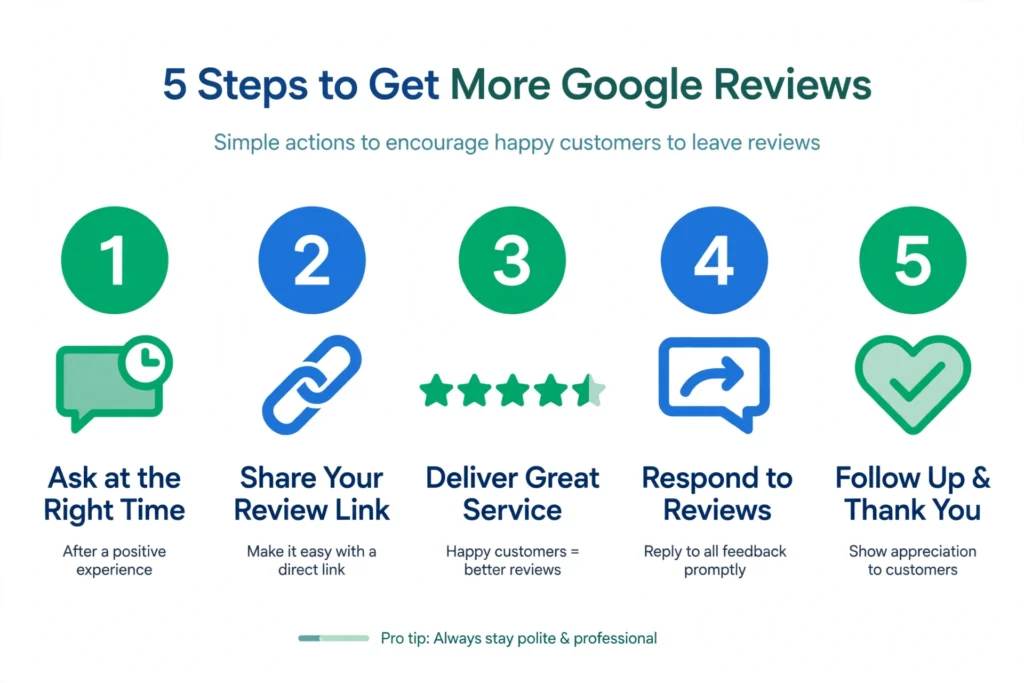
A Quick-Start Plan for How to Get More Google Reviews for My Business This Week
If you need results fast, start with tactics 1, 2, and 4. Ask in person at the moment of delight, send follow-up texts within the hour, and put QR codes where customers wait. These three alone can produce your first new reviews within days. Then layer in the rest for a system that runs all year.
1. Ask at the Perfect Moment
Timing is everything. Ask right after a moment of delight: when the meal was excellent, the repair worked, or the client said thank you. Happy customers in the moment say yes far more often than those asked days later by email.
Train yourself and your team to recognize these moments. A simple “I’m so glad you’re happy — would you mind sharing that on Google? It really helps us” works wonders.
2. Send a Follow-Up Text Message
For service businesses, a text sent an hour after the job works extremely well. Keep it short and personal. Include your review link. Texts get opened far more than emails, and the timing catches customers while they are still pleased.
Example: “Hi Sarah, this is Mike from ABC Plumbing. Glad we got your drain cleared today! If you have a minute, a Google review would mean a lot: [link]. Thanks!”
3. Add the Ask to Your Email Follow-Up
Send a thank-you email one to two days after purchase or service. Keep it brief, thank them sincerely, and include a clear button linking to your review form. One ask per email is enough. Do not bury it under five other requests.
4. Put QR Codes Where Customers Wait
Waiting areas are review goldmines. A table tent that says “Love your visit? Scan to review us on Google” catches people with time on their hands. Restaurants, salons, clinics, and auto shops all benefit from this simple placement.

5. Add the Link to Receipts and Invoices
Print your review link or QR code on every receipt, invoice, and thank-you card. Customers often keep these. When they get home and feel good about the experience, the link is right there waiting.
6. Train Your Team to Ask Naturally
Your staff talks to more customers than you do. Teach them a simple, natural ask and when to use it. Role-play it once so it feels comfortable. Recognize team members whose customers leave reviews. What gets recognized gets repeated.
7. Create a “Review Us” Page on Your Website
Add a page or section explaining how to leave a Google review, with step-by-step instructions and your direct link. Some customers want to help but do not know how. Remove every bit of friction.
8. Mention Reviews in Your Email Signature
Add a one-line link in your team’s email signatures: “Happy with our service? Leave us a Google review.” Every email becomes a gentle reminder. This costs nothing and runs forever.
9. Ask for Feedback First, Then Guide Happy Customers
Send a quick satisfaction check: “How was your experience?” Customers who reply positively get your review link. Those who reply negatively get your attention and a fix first. This protects your rating while still generating reviews.
10. Use Social Media to Remind Followers
Occasionally post asking followers to share their experience on Google. Share your best reviews as graphics (with permission implied by their public posting). Social proof attracts more social proof.
11. Follow Up Once With Non-Responders
One polite reminder a week later is fine. Many people intend to review and simply forget. A single nudge often doubles your response rate. More than one follow-up feels like pressure, so stop at one.
12. Make It Part of Project Completion
For contractors, agencies, and B2B services, add the review request to your project closeout checklist. When you deliver the final files or walk through the finished work, ask then. Bundle it with asking for a testimonial you can use on your site.
13. Spotlight Reviews to Encourage More
When someone leaves a great review, thank them publicly where appropriate and feature it on your website or social media. Seeing their words celebrated motivates others to share their own experiences.
14. Ask Vendors and Partners
Businesses you work with can also leave reviews if they have genuinely used your services. A supplier who loves your reliability or a partner you delivered great work for are legitimate reviewers. Never trade reviews as a favor exchange, though. Each review must reflect a real experience.
15. Keep the System Running With a Monthly Check
Review your review count on the first of each month. If it stalled, something broke: staff stopped asking, the QR code faded, or the email stopped sending. A five-minute monthly check keeps the machine running all year.
How to Respond to Google Reviews Like a Pro
Getting reviews is half the job. Responding well doubles their value.
Respond to Every Review Within Days
Aim to reply within two to three days. Fast responses show you are attentive. They also show Google your profile is active, which supports your local visibility.
Personalize Every Positive Response
Skip generic copy-paste replies. Use the reviewer’s name. Mention something specific from their review. “Thanks, Maria! We’re thrilled the birthday cake was a hit” beats “Thanks for your review!” every time. Specific replies feel human and build loyalty.
Turn Responses Into Mini-Marketing
Naturally mention your services and location in replies. “We’re glad our emergency drain cleaning helped out in Austin!” This reinforces relevance for local searches while sounding completely natural to readers.
How to Handle Negative Google Reviews
Bad reviews sting, but handled well, they can actually help you. Many customers read negative reviews first to see how a business responds.
Stay Calm and Never Argue
Read the review twice before replying. Then respond as if the whole neighborhood is watching, because it is. Apologize for their experience without admitting fault you do not own. Offer to make it right offline with a phone number or email.
Example: “We’re sorry your visit didn’t meet expectations, James. We’d like to understand what happened and make it right. Please reach us at [phone] so we can help.”
Fix the Real Problem Behind It
If several reviews mention the same issue, it is not a review problem. It is a business problem. Fix the slow service, the confusing billing, or the rude staff member. Reviews are free market research. Use them.
Know When to Flag a Review
Flag reviews that break Google’s rules: fake reviews from competitors, spam, hate speech, or reviews about a different business. Use the flag option in your dashboard. Do not flag honest negative reviews you simply dislike. Google will not remove those, and trying looks bad.
Review Mistakes That Can Get You Penalized
Google takes review manipulation seriously. Avoid these completely.
- Buying reviews. Paid reviews are easy to spot and can get your profile suspended.
- Posting fake reviews yourself. This includes asking friends or family to review experiences they never had.
- Review gating. You may not filter customers, asking only happy ones to review while steering unhappy ones away. Ask everyone equally.
- Offering rewards for positive reviews. Discounts or gifts in exchange for five-star reviews violate policy. You can run a general feedback program, but never tie rewards to positive ratings.
- Setting up a review station. A tablet at your counter logged into customer accounts looks like manipulation. Let customers use their own devices.
- Review swaps with other businesses. “I’ll review you if you review me” creates fake reviews on both sides.
When in doubt, ask yourself: does this review reflect a genuine customer experience? If yes, you are safe.
Expert Tips for a Steady Stream of Reviews
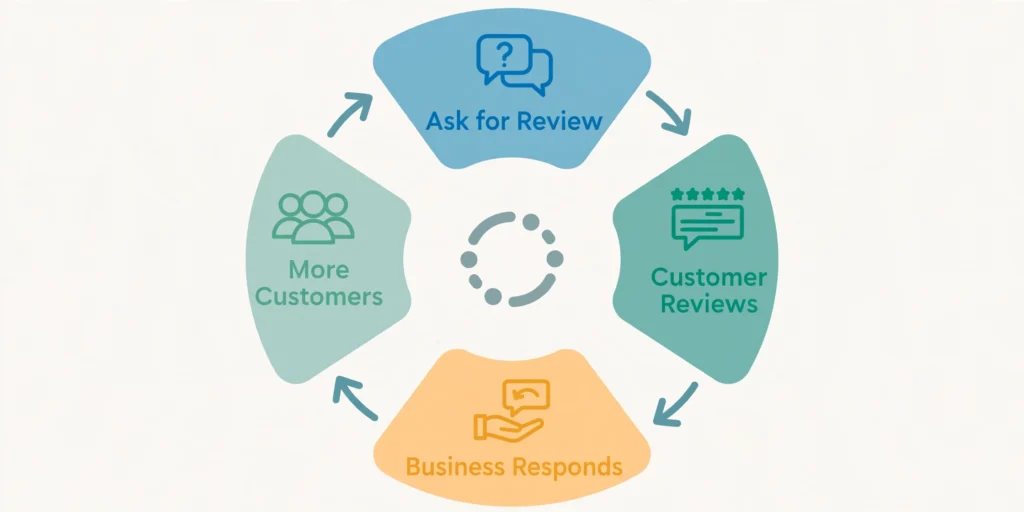
- Name the specific experience when you ask. “Would you mind mentioning the kitchen remodel on Google?” Reviews with details help you rank for those services.
- Track who you asked. A simple spreadsheet prevents awkward double-asks and shows which methods work best.
- Celebrate milestones with your team. Hitting 50 or 100 reviews is worth recognizing. Momentum is motivating.
- Add reviews to your website. A testimonials page featuring Google reviews builds trust with visitors and encourages more reviewers.
- Watch competitors’ review counts monthly. Your goal is to stay ahead of the businesses you compete with in the map pack.
- Respond in the reviewer’s language. If someone writes in Spanish, reply in Spanish. It shows respect and reaches more of your community.
What Changed for Google Reviews in 2027
Google continues to crack down on fake reviews with better detection. Businesses using review farms or gating tools face faster penalties than before. The honest, systematic approach in this guide is also the safest one.
AI Overviews now sometimes summarize business reviews in search results. This means the actual words in your reviews matter more. Detailed, specific reviews help Google describe your business accurately to searchers.
Video reviews and photo reviews carry extra weight with customers. Encourage happy customers to add a photo with their review. A picture of your work is worth a thousand stars.
Want more ways to win local customers? Explore more local SEO guides on SearchEngineInsight.
Frequently Asked Questions
How long does it take to get more Google reviews?
With a consistent system, most businesses see new reviews within the first week. Building a strong review profile takes three to six months of steady asking. The key is consistency: asking every happy customer, every time, rather than running occasional big pushes.
How many Google reviews do I need?
Aim to have more recent reviews than your top local competitors. If the three businesses ranking above you average 80 reviews, make 100 your target. There is no magic number from Google. Competitive parity plus steady freshness is what moves rankings.
Can I offer a discount for a Google review?
No, not for positive reviews. Offering rewards only for five-star reviews violates Google’s policies and can get your reviews removed or your profile suspended. Ask honestly without incentives tied to ratings. A genuine ask at the right moment works better anyway.
Why did my Google review disappear?
Google removes reviews that violate its policies, including fake reviews, spam, and reviews with conflicts of interest. Sometimes legitimate reviews get caught by automated filters. If a real customer’s review vanished, ask them to repost it. Avoid anything that looks like manipulation to prevent future removals.
Should I respond to every Google review?
Yes. Respond to all reviews within a few days. Thank positive reviewers by name and mention something specific. Address negative reviews calmly and offer to resolve the issue offline. Responses show future customers you care, and they keep your profile active.
How do I get a direct link to my Google review form?
Open your Google Business Profile dashboard and look for the option to share your review form or get more reviews. Google provides a short link for your business. Copy it and use it in texts, emails, receipts, and QR codes. This link is the foundation of your review system.
Is it bad to have a few negative reviews?
No. A perfect 5.0 rating with hundreds of reviews can actually look suspicious. A 4.6 to 4.9 rating with thoughtful responses to criticism looks authentic and trustworthy. What matters is the overall pattern and how professionally you handle complaints.
Can I ask customers for reviews on platforms other than Google?
Absolutely. Yelp, Facebook, and industry-specific sites all matter. But prioritize Google reviews first, since they appear directly in Google search and Maps results where most customers look. Once your Google flow is steady, expand to one or two other platforms.
What is review gating and why is it banned?
Review gating means filtering customers so only happy ones are asked to review, while unhappy ones are steered away. Google bans this because it creates a misleading picture. Ask every customer equally. Handle unhappy customers with great service, not by hiding their opinions.
How do I report a fake Google review?
In your Business Profile dashboard, find the review and use the flag or report option. Choose the reason that fits, such as spam or conflict of interest. Google reviews the report and removes violating reviews. This can take several days. Always respond professionally while you wait.
Do Google reviews help my website rank, not just my map listing?
Yes, indirectly. Reviews build trust and click-through rates, which bring more traffic. Review text also reinforces what your business does and where. While reviews primarily affect local pack rankings, the prominence they build supports your overall local presence, including organic results.
What should I do if a competitor leaves a fake negative review?
Document everything and flag the review through your dashboard as a conflict of interest. Respond calmly without accusing anyone publicly. If Google does not remove it, a professional response showing your side still protects your reputation. Never retaliate with fake reviews of your own.
Conclusion:How to Get More Google Reviews for My Business
Learning how to get more Google reviews for my business comes down to one simple truth: you have to ask, and you have to make it easy. Set up your review link and QR code, ask at the perfect moment, follow up once by text or email, and respond to every review you receive.
Do it honestly and consistently, and the reviews will compound. More reviews mean better rankings, more clicks, and more customers choosing you over the competition. Start today with just one tactic from this guide, then add the rest over the coming weeks. Your future customers are reading reviews right now. Make sure yours tell a great story.